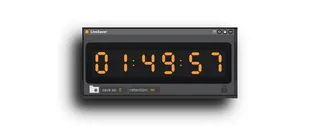
LiveSaver2.
LiveSaver is a Max for Live device that automatically saves ...
- Type
- MIDI Effect
- Author
- bugbytz
- Version
- 0.5.1
- License
- Commercial
- Live version
- 12.2.5
- Max version
- 9.0.8
- Downloads
- 1
- Updated
- 2026-05-28
LiveSaver2. is a MIDI Effect for Ableton Live by bugbytz, distributed as a commercial (paid) device. It targets Live 12.2.5 and Max 9.0.8. On maxforlive.com it has 1 downloads. First published 2025-09-12, last updated 2026-05-28. 11 user comments below.
New to Max for Live? Read what MIDI Effects do, what the Commercial license means, how to install a device.
Description
LiveSaver is a Max for Live device that automatically saves your Ableton Live Sets on a schedule you choose. Set an interval, start it, and LiveSaver will trigger a save at that cadence while you work. The device’s look dynamically matches the Ableton Live theme you’re using. One .amxd works in both Live 11 and Live 12. When Ableton crashes, sometimes VST parameters are entirely lost; by periodically saving your set, LiveSaver will mitigate the impact of these unfortunate situations.
Support was also added for Ableton Live 11.3.42
Comments (11)
The separator lights flash but it doesn't seem to be saving, or counting down but not sure if it's supposed to count.
Thanks
Before LiveSaver, I got frustrated when I was on a roll 'n' recording tracks — only to have everything disruptively halt after a crash, and losing my VST settings too ughhh. To add insult to injury, Live also doesn't reliably always restore, so I had to go even further back.
Now with LiveSaver, I have peace of mind. It's easy to change the save time interval on-the-go, and overwrite the default so it automatically shows up. Even if Live's in the background, it'll momentarily bring it to the foreground to save. (And you can toggle LiveSaver off as-needed.)
I have LiveSaver as part of my project template so it saves me every 10 minutes, and overall it's worked robustly across dozens of projects thus far. I'll continue to report issues as I notice 'em.
💖💾