- Type
- Audio Effect
- Author
- ntrm
- Version
- 0.1
- License
- Attribution
- Live version
- 12.0.5
- Max version
- 9.0.9
- Downloads
- 158
- Updated
- 2025-10-18
Cues is an Audio Effect for Ableton Live by ntrm, distributed as Creative Commons Attribution. It targets Live 12.0.5 and Max 9.0.9. On maxforlive.com it has 158 downloads. Published 2025-10-18.
New to Max for Live? Read what Audio Effects do, what the Attribution license means, how to install a device.
Description
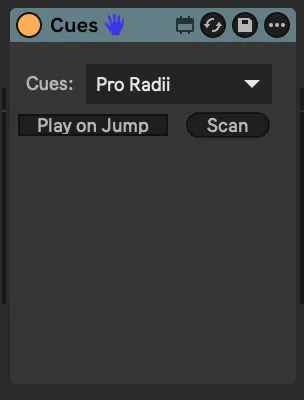
Basic device that allows you to jump to locators on the Arrangement View timeline for managing cues or setlists during live performance.
https://youtu.be/iOgCbn822Cw?si=NjeZyqqi-JVug4l7
Instructions
- To create cue points, create Locators on the Arrangement view timeline
- The dropdown menu in the Cues device should automatically populate with your cue points
- Select a cue point to jump the timeline to that position
- If Play On Jump is enabled, jumping will start the transport if it is stopped (if the transport is already playing, it will continue playing regardless of this setting).