- Type
- Audio Effect
- Author
- Ya
- Version
- 1.0
- License
- AttributionNonCommercialShareAlike
- Live version
- 12.2
- Max version
- 9.0.5
- Downloads
- 237
- Updated
- No Updates
Prefix is an Audio Effect for Ableton Live by Ya, distributed as Creative Commons Attribution-NonCommercial-ShareAlike. It targets Live 12.2 and Max 9.0.5. On maxforlive.com it has 237 downloads. Published 2025-10-31.
New to Max for Live? Read what Audio Effects do, what the AttributionNonCommercialShareAlike license means, how to install a device.
Description
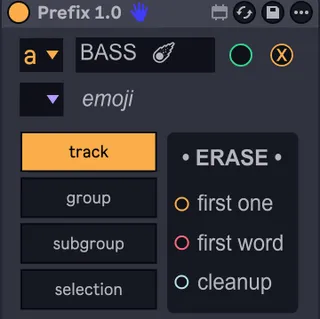
Prefix is a Max for Live device designed to automate and customize the renaming of tracks, groups, and subgroups in Ableton Live.
It streamlines complex projects by applying consistent, dynamic naming conventions tailored to your creative workflow.
______________________________
•• RENAMING FUNCTION ••
______________________________
▶ Track
• Automatically renames all tracks in your Live set, including those nested within groups or subgroups.
• Apply customizable prefixes, either static or dynamic:
- Sequential letters (A, B, C…) — static
- Incremental numbers (01, 02, 03…) — static
- Iterative patterns (e.g., #, ##, ### → 1, 01, 001) — dynamic
Examples:
[A, B, C...] Drums → A Drums Kick, B Drums Snare…
[1, 2, 3...] FX → 01 FX Reverb, 02 FX Delay…
[###] Kick → 001 Kick, 002 Kick…
▶ Group
• Automatically renames all top-level group tracks.
• Compatible with any prefix format: letters, numbers, or custom symbols.
▶ Subgroup
• Detects nested groups (subgroups) and applies a dedicated prefix.
• Only visible subgroups are processed — hide subgroups to preserve name integrity.
▶ Selection Renaming
• Renames only the currently selected tracks in your Live session.
• Useful for adding a static prefix to a specific section.
_____________________
• ERASE SECTION •
_____________________
• Operates only on the selected scope (track, group, subgroup, or selection).
Automatically removes:
- The first character.
- The first word.
- Any detected prefix (letter, number, or symbol) within the chosen selector.
______________________________________
►Requires Ableton Live 12.2 or later
Works with all track types (audio, MIDI, groups).