Modulatorinator
This Maxinator Device gives you the ability to easily modula...
- Type
- Audio Effect
- Author
- kenan
- Version
- 0.4
- License
- None
- Live version
- 8.3
- Max version
- 5.1.9
- Downloads
- 906
- Updated
- No Updates
Modulatorinator is an Audio Effect for Ableton Live by kenan, distributed as freeware, with no license specified by the author. It targets Live 8.3 and Max 5.1.9. On maxforlive.com it has 906 downloads. Published 2013-01-21. 8 user comments below.
New to Max for Live? Read what Audio Effects do, how device licenses work, how to install a device.
Description
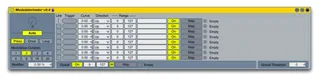
This Maxinator Device gives you the ability to easily modulate controls and effects with a press of a button. Modulatorinator is great for creating filter sweeps, dynamic delays, volume swells and fades, and distortion crescendos that activate at the touch of a button.
Up to Eight parameters can be mapped to Modulatorinator along with a Global parameter that kicks on whenenver any of the other parameters activate (perfect for turning a device on and off as you modulate it). If eight parameters isn't enough, you can chain Modulatorinators to your heart's content (or you run out of CPU cycles). Each mapped parameter is individually configured for direction (the modulation can sweep up, down, or up and down), range, and curve.
More info on my website.
Comments (8)
Or a fade to grey at the press of a button. Right now it's a temporary fade to grey. It would be cool to have it fully faded permanently.
, since there's no modulation function, I mapped to Modulatorinator 0.4, however the volume parameter can't hold at peak 127, ideally if it's possible, a press button, when it's on stay at 127 and at release/off fade back to 0.
Same situation with spin cycle. anyway, bravo bravo work. please help me out
Very nice, like it a lot, learned a bit more about what people mean by "303" just by playing with this device.