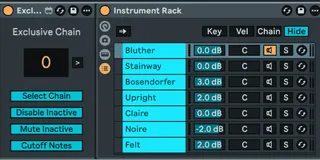
Exclusive Chain
One of typical use cases for Ableton Live racks is an instru...
- Type
- MIDI Effect
- Author
- Maboroshy
- Version
- 1.1
- License
- None
- Live version
- 12
- Max version
- 8.6
- Downloads
- 399
- Updated
- 2026-02-02
Exclusive Chain is a MIDI Effect for Ableton Live by Maboroshy, distributed as freeware, with no license specified by the author. It targets Live 12 and Max 8.6. On maxforlive.com it has 399 downloads. First published 2026-01-25, last updated 2026-02-02. 11 user comments below.
New to Max for Live? Read what MIDI Effects do, how device licenses work, how to install a device.
Description
One of typical use cases for Ableton Live racks is an instrument or effects path selector, when you want only one exclusive chain active at a time, with others disabled to save CPU resources. There's a recipe that involves mapping rack's chain selector and each device's on/off toggle to a single macro knob.
My device does this without all these mappings and provides a numberbox that:
- automatically attaches to the next rack on the track or chain, any type of rack (won't be useful with a drum rack)
- selects chosen chain putting the "blue hand" on its first device
- mutes all the other chains
- enables the first device on the chosen chain (or more if you group them)
- disables the first devices on the other chains
- sends "note off" and resets sustain before changing chain
Unlike chain selector mapping recipe, you can add, remove or rearrange rack chains without needing to update any mappings.
The device also provides +/- and chain index buttons for controller mapping. There's an option for the buttons to work only while the track is armed, which allows sharing controller mappings with similar devices on other tracks. The numberbox doesn't respect this option and will always work. The buttons can't be used while the numberbox is mapped to a controller.
The "blue hand" following chain selection can't be disabled. If you rely on the "blue hand" staying on a particular device and want to active chain selection, you'll have to disable the "Select Chain" option and use the rack's chain selector instead.
The device is also hosted on GitHub: https://github.com/Maboroshy/Max-for-Live-Devices/tree/main/Exclusive%20Chain
You can get an audio version there.
Licensed under the GNU Lesser General Public License v3.0 (LGPL‑3.0).
Changelog
v1.1 - 02.02.2026
- Fixed Exclusive Chain parameter automation
- Improved rack detection
- Silenced unwanted console messages
Comments (11)
https://github.com/Maboroshy/Max-for-Live-Devices/raw/refs/heads/testing/Exclusive%20Chain/Exclusive%20Chain%201.0%20(MIDI)%20(test).amxd
To change chains and play notes simultaneously, you'll need to disable the “Disable Inactive” and “Cut Off Notes” options and use only “Mute Inactive.” Enabling and disabling devices takes time, so notes played right at chain change may end up somewhere in between. I advise leaving a margin between changing the chain and playing notes.
I could add more buttons but I think about making universal "button device" that can be mapped to any parameter instead.
I'll implement the delays in the next version.