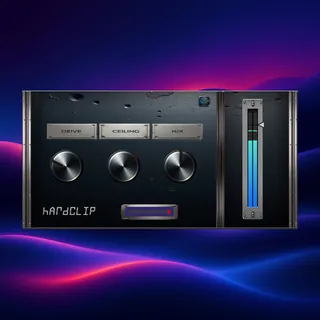
AWS Hardclip
When your mix won’t get loud without the limiter flattenin...
- Type
- Audio Effect
- Author
- AnalogWaveStudio
- Version
- 1.0
- License
- None
- Live version
- 12.0.5
- Max version
- 8.6.2
- Downloads
- 0
- Updated
- No Updates
AWS Hardclip is an Audio Effect for Ableton Live by AnalogWaveStudio, distributed as freeware, with no license specified by the author. It targets Live 12.0.5 and Max 8.6.2. Published 2026-02-06.
New to Max for Live? Read what Audio Effects do, how device licenses work, how to install a device.
Description
When your mix won’t get loud without the limiter flattening everything, the real problem is usually transient peaks (kicks, snares, plucks) eating all your headroom. Hard clipping solves that by shaving the very top of peaks so you can push level without the limiter doing all the work — which often means more punch, less pumping, and a tighter low end.
AWS – Hardclip is a simple, no-fuss hard clipper built for quick peak control and loudness.
Why hard clipping works
More headroom fast: trim peaks before they hit your limiter.
Louder without collapse: limiter has less to catch, so transients stay clearer.
Tighter drums: controlled peaks = more consistent impact.
When to use it
Drum Bus: your kick/snare hit hard but the bus is spiky.
Pre-Master: limiter is grabbing 3–6 dB and the mix loses movement.
Problem tracks: harsh peaks on synths, percussion, or vocals that trigger compression.
Controls
Drive — push into clipping
Ceiling — set the final output cap
Mix — parallel blend to keep punch
Quick start
Drop it on Drum Bus or Pre-Master.
Set Ceiling (start around -0.3 dB).
Add Drive until peaks feel controlled.
Back off with Mix if you want more transient bite.
Included
AWS - Hardclip.amxd
README.txt, CHANGELOG.txt, LICENSE.txt
Compatibility
Ableton Live 12 Suite (Max for Live)
macOS & Windows