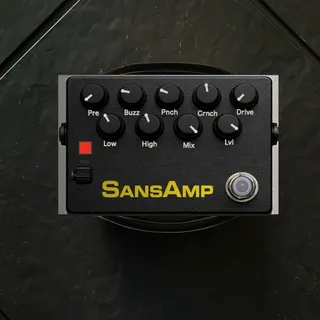
- Type
- Audio Effect
- Author
- AnalogWaveStudio
- Version
- 1.0
- License
- None
- Live version
- 12.0.5
- Max version
- 8.6.2
- Downloads
- 0
- Updated
- 2026-04-04
SansAmp is an Audio Effect for Ableton Live by AnalogWaveStudio, distributed as freeware, with no license specified by the author. It targets Live 12.0.5 and Max 8.6.2. Published 2026-04-04.
New to Max for Live? Read what Audio Effects do, how device licenses work, how to install a device.
Description
30% off until monday with discount code 'EASTER30'
Hear it in action! - https://youtube.com/shorts/pqJ257IqOiQ?feature=share
What is SansAmp?
A Max for Live device that emulates the Tech 21 SansAmp — the legendary tube amp emulator used on countless records. Adds amp-like character to guitar and bass DI signals.
2. How is this different from amp simulators?
Amp sims simulate the entire chain (amp, cab, mic). SansAmp focuses on the preamp character — the tube saturation, the presence, the midrange push. It's faster, lighter, and sounds like an amp without needing one.
3. What instruments is it for?
Guitar and bass. Designed specifically for DI signals that need amp character. Works on:
Electric guitar DI
Bass guitar DI
Acoustic guitar (for warmth)
Synths (for grit)
4. Where should I put it in my chain?
First. Right after your DI. Then EQ, compression, effects. SansAmp shapes the source — treat it like an amp.
5. Does it have cabinet simulation?
No. This is pure SansAmp — the preamp character. Pair it with your favorite IR loader or cab sim if you want the full amp experience.
6. Can I use this for bass?
Yes — bass is one of the main use cases. The SansAmp Bass Driver is legendary for a reason. This gives you that same growl and grind in Ableton.
7. How does it compare to free saturation plugins?
Free saturation adds color. SansAmp adds amp character — the dynamic response, the midrange push, the "feels like an amp" quality. It's not just saturation — it's emulation.
Max for Live Ableton Device
AnalogWave-Studio