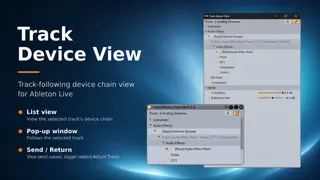
Track Device View
Track Device View is a Max for Live utility for Ableton Live...
- Type
- Audio Effect
- Author
- KOMOFORGE
- Version
- 1.1.1
- License
- Commercial
- Live version
- 12.4.3
- Max version
- 9.1.4
- Downloads
- 0
- Updated
- 2026-07-21
Track Device View is an Audio Effect for Ableton Live by KOMOFORGE, distributed as a commercial (paid) device. It targets Live 12.4.3 and Max 9.1.4. First published 2026-06-14, last updated 2026-07-21.
New to Max for Live? Read what Audio Effects do, what the Commercial license means, how to install a device.
Description
Track Device View is a Max for Live utility for Ableton Live 12.x that displays the selected track's device chain in an easy-to-read vertical list.
When a track contains many devices, Live's horizontal Device View can become difficult to scan. Track Device View provides a clearer overview of the device chain without requiring constant horizontal scrolling.
Open the pop-up window and switch tracks in Live; the window automatically updates to follow the currently selected track. You only need to insert Track Device View on one track.
Features:
* Easy-to-read list view of the selected track's device chain
* MIDI Effects / Instrument / Audio Effects sections
* Rack and Chain display, including nested racks up to a limited depth
* Track-following pop-up window
* Send names, values, and sliders shown in the pop-up window
* Adjust Send levels by dragging the slider in each Send row
* Toggle related Return Tracks on/off from the pop-up window
* Click a device name to select that device in Live
* Double-click a device name to select and collapse or expand that device in Live's Device View
* Collapse or expand all devices on the selected track
* Toggle devices on/off from the list
* Toggle multiple selected devices on/off
* Delete selected devices or racks from the pop-up window
* Pin option for keeping the pop-up window on top
* Icon-based controls for Collapse/Expand All, Show/Hide Window, Delete, and Pin
* English descriptions displayed in Live's Info View
Track Device View does not process or change the sound. It is a utility for viewing and managing the selected track's device chain.
--- Version 1.1.1 ---
* Fixed bugs
--- Version 1.1 ---
* Added a Collapse/Expand All control
* Added collapse and expand control for individual devices by double-clicking their names
* Replaced the Collapse/Expand All, Show/Hide Window, Delete, and Pin text buttons with icons
* Refined button outlines and borders
* Added English Info View descriptions
* Improved shutdown stability and pop-up window cleanup
* Prevented repeated errors during shutdown
* Improved device disable and enable handling
--- Version 1.0 ---
Initial release.
Requires Ableton Live 12 Suite or Ableton Live 12 Standard with Max for Live.
Not compatible with Live Lite or Intro.
Tested with Ableton Live 12.4.3 and Max 9.1.4 using Live's bundled Max for Live environment.
Track Device View requires a Max for Live environment that supports the Max v8ui object.
If the device appears as a diagonal placeholder labeled "v8ui," please update Ableton Live 12 and its bundled Max version, or make sure Live is not using an older external Max installation.