Quick Launcher
Quick Launcher puts your favorite presets one keypress away....
- Type
- Audio Effect
- Author
- LiveWorkflowTools
- Version
- 1.0.2
- License
- None
- Live version
- 12.0.5
- Max version
- 8.6.2
- Downloads
- 0
- Updated
- 2026-06-22
Quick Launcher is an Audio Effect for Ableton Live by LiveWorkflowTools, distributed as freeware, with no license specified by the author. It targets Live 12.0.5 and Max 8.6.2. First published 2026-06-16, last updated 2026-06-22.
New to Max for Live? Read what Audio Effects do, how device licenses work, how to install a device.
Description
Quick Launcher puts your favorite presets one keypress away.
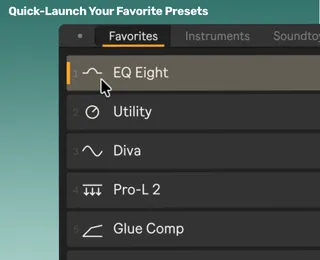
Map the Launch button once, add your go-to presets to one folder, and a compact launcher opens directly at your cursor whenever you need it.
Click a slot or press 1-9 to load Ableton Live and Max for Live device presets, racks, and VST3/AU plugin presets without digging through Live’s Browser.
----
Why producers use Quick Launcher:
- Favorite presets within reach: Launch Ableton Live and Max for Live device presets, racks, and VST3/AU plugin presets from one compact window.
- Opens at your cursor: Press your mapped key or MIDI control and Quick Launcher appears where you are working, ready to launch.
- Click or press 1-9: Launch visible slots with the mouse or number keys while building chains.
- Folder-based tabs: Organize favorites into folders and Quick Launcher turns them into simple category tabs.
- Pin Mode: Keep the launcher open when you want to add multiple devices or presets in a row.
- Edit Mode: Reorder presets, rearrange tabs, and choose from over 100 custom and themed icons so your launcher feels like your setup.
- Smart insertion: Loads presets after the selected device where possible, or at the end of the selected track.
- Lightweight and focused: Built to stay out of the way until you need it.
----
What it launches:
- Ableton native and Max for Live device presets: .adv
- Ableton racks: .adg
- VST3 plugin presets: .vstpreset
- Audio Unit plugin presets: .aupreset
On first launch, Quick Launcher shows you where to drop your presets to get started directly.
----
Setup in 3 quick steps
1. Drop Quick Launcher into your set.
2. Put your favorite presets into the Quick Launcher folder.
3. Done ✅ Map the Launch button in Live and start quick-launching.
----
Continued support and free feature updates included.
If you run into an issue or have an idea that would make Quick Launcher better, simply send me a message.