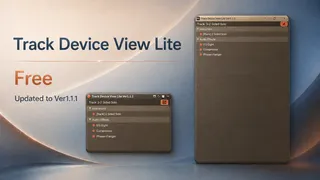
Track Device View Lite
Track Device View Lite is a free Max for Live utility for Ab...
- Type
- Audio Effect
- Author
- KOMOFORGE
- Version
- 1.1.1
- License
- None
- Live version
- 12.4.3
- Max version
- 9.1.4
- Downloads
- 123
- Updated
- 2026-07-22
Track Device View Lite is an Audio Effect for Ableton Live by KOMOFORGE, distributed as freeware, with no license specified by the author. It targets Live 12.4.3 and Max 9.1.4. On maxforlive.com it has 123 downloads. First published 2026-06-23, last updated 2026-07-22. 2 user comments below.
New to Max for Live? Read what Audio Effects do, how device licenses work, how to install a device.
Description
Track Device View Lite is a free Max for Live utility for Ableton Live 12.x that displays the selected track's devices in a clear vertical list.
When a track contains many devices, Live's horizontal Device View can become difficult to scan. Track Device View Lite gives you a simple overview of the selected track's device chain without constant horizontal scrolling.
Open the pop-up window and switch tracks in Live; the window automatically follows the currently selected track. You only need to insert Track Device View Lite on one track.
Features:
* Easy-to-read list view of the selected track's devices
* MIDI Effects / Instrument / Audio Effects sections
* Toggle devices on/off from the main panel
* Track-following pop-up window
* View device on/off status in the pop-up window
* Double-click a device name to select that device in Live's Device View
* Pop-up window opens automatically when the device is inserted
Lite limitations:
* No Rack / Chain internal display
* Racks are shown as a single [Rack] device
* No device on/off control from the pop-up window
* No multi-selection
* No multi-device batch on/off
* No Send name / value / slider display
* No Return Track on/off control
* No delete function
For Rack / Chain browsing, multi-selection, pop-up window controls, Send / Return controls, Delete, and additional workflow features, see the full version:
https://komoforge.gumroad.com/l/track-device-view
Track Device View Lite does not process or change the sound. It is a utility for viewing and selecting devices on the currently selected track.
--- Version 1.1.1 ---
* Improved Live API startup handling and overall stability
* Improved pop-up window behavior
* Updated Lite behavior and UI text
--- Version 1.0 ---
* Initial release
Requires Ableton Live 12 Suite or Ableton Live 12 Standard with Max for Live.
Not compatible with Live Lite or Intro.
Tested with Ableton Live 12.4.3
Comments (2)