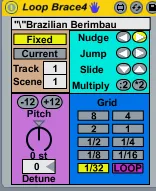
Loop and Pitch Clip Control
Control the loop and pitch parameters of a clip. Works with ...
- Type
- MIDI Effect
- Author
- Prebentious
- Version
- 1.01
- License
- None
- Live version
- 8.1
- Downloads
- 3,763
- Updated
- 2010-01-31
Loop and Pitch Clip Control is a MIDI Effect for Ableton Live by Prebentious, distributed as freeware, with no license specified by the author. It targets Live 8.1. On maxforlive.com it has 3,763 downloads. First published 2009-12-30, last updated 2010-01-31. 14 user comments below.
New to Max for Live? Read what MIDI Effects do, how device licenses work, how to install a device.
Description
Control the loop and pitch parameters of a clip. Works with either a fixed track and scene or the currently highlighted clip. Let me know if there are any bugs.
1.01: I froze the device to include the arrow pictures.
Comments (14)
Yes , if someone can add "launch mode access", would be perfect!
Inside p loopmult object find the multiply object and change to floating point integer, so change * 2 to * 2.
Great thing about max you can squash your own bugs quick.
Thanks! I updated the device
Any ideas on how I could get around this? Maybe some kind of auto-refresh?
Thanks a lot!
1. It selects the current clip when the "Current" is selected but it wont then change any of the parameters I tried altering - loop length and pitch. - These both work ok when I use the "fixed clip" option.
2. When using it in Fixed mode I tried to change the channel by midi - but there is no linear relation to the channel number - so e.g if I send a cc value of "2" it ends up on channel 5
If these things worked the device would be fantastic
Best - Soupsounds
I did however find a couple bugs. Maybe you're aware of this, maybe it's standard functionality. When i hit the nudge or jump buttons on your device sometimes, the patch will move my start and end markers on the track I'm looping, Sometimes it moves the end marker to right outside the loop brace and when i exit the loop the music will stop immediately. I'm always jumping around in my set and don't always have time to sit and view the waveform to watch for this. I really like this patch and want to incorporate it into my sets permanently, however this behavior could be catastrophic while playing a live. Your device should be a standard feature in live.
Keep up the great work.