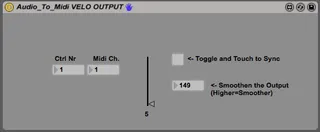
REALTIME Audio To Midi Converter VELOCITY OUTPUT
This Version has been frozen to make it easier to work with...
- Type
- MIDI Effect
- Author
- diego19187
- Version
- 0.9.2
- License
- None
- Live version
- 9.0.1
- Max version
- 6.1
- Downloads
- 3,329
- Updated
- 2014-05-02
REALTIME Audio To Midi Converter VELOCITY OUTPUT is a MIDI Effect for Ableton Live by diego19187, distributed as freeware, with no license specified by the author. It targets Live 9.0.1 and Max 6.1. On maxforlive.com it has 3,329 downloads. First published 2013-05-04, last updated 2014-05-02. 1 user comment below.
New to Max for Live? Read what MIDI Effects do, how device licenses work, how to install a device.
Description
This Version has been frozen to make it easier to work with
REALTIME_Audio_To_Midi_Velocity
This Patch is just optional, you can use the velocity from REALTIME_Audio_To_Midi INPUT to trigger anything in Ableton.
You MUST activate "Toggle to control in Ableton" on the REALTIME_Audio_To_Midi INPUT - Device to make this work!!!
Smoothen the Signal with the new Signal-Smother (TM)
you need sigmund~
http://crca.ucsd.edu/~tapel/software.html
to make this work!!!
you need REALTIME_Audio_To_Midi INPUT to make this work!!!
Put Audio in, get Midi Out
(With velocity and experimental PitchBend)
a little twitchy but who cares, it's experimental ;)
not really stable yet!!!
Put the REALTIME_Audio_To_Midi INPUT Patch on a monophonic Audio Track or Input you'd like to get as Midi-Stream.
Put the REALTIME_Audio_To_Midi OUPUT Patch on a Midi Track and the Synth/Sampler or Hardware you want to use, behind it.
You can pitch up to 3 different voices away from your original tone and the original tone itself.
I recommend experimenting with the Arpeggiatior/Chords/Velocity Midi Devices of Ableton.
This is work in progress.
Any Tipps, Ideas or fixes are welcome!
Cheers!
Comments (1)
Works fine! But here is one thing that I need your help with... Please, see the video https://youtu.be/w88zxWWP7xk
The channel PARS, that midi-data is transmitted from, eventually has two modes:
1) midi notes, when midi-generating device is off
2) sound-reactive mode, firing submasters
But when i switch FROM the clip with device ON mode - It leaves the channel, that it was firing - right where it was at the moment this switch happened. Nothing wrong with that behaviour, I guess, that's how it supposed to be until nothing else is commanded...
So I need to have the command, resetting certain submaster level back to OFF, so it does not leave the light on...
Dear Diego, could you, please, help me with this implementation?
Thank You, Merry Christmas!