- Type
- MIDI Effect
- Author
- tomcosm
- Version
- 1.0
- License
- None
- Live version
- 9.0.1
- Max version
- 6.1
- Downloads
- 1,497
- Updated
- 2013-05-08
Dual Toggle is a MIDI Effect for Ableton Live by tomcosm, distributed as freeware, with no license specified by the author. It targets Live 9.0.1 and Max 6.1. On maxforlive.com it has 1,497 downloads. Published 2013-05-08. 1 user comment below.
New to Max for Live? Read what MIDI Effects do, how device licenses work, how to install a device.
Description
Video Explanation here - http://youtu.be/6VbHS6jhBHM
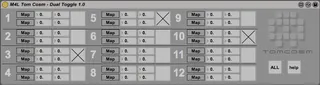
This patch allows you to map two parameters to a toggle button and specify what percentage of the maximum and minimum values are depending on whether the toggle button is OFF or ON, 12 times.
1) Click on the first Map button for one of the instances, and then click on the first parameter you wish to modify.
2) Drag or type into the number boxes (0-100) what values you want that parameter to be on both the off and on states.
3) Repeat for the second mapping.
3) Click (or map) the toggle box to switch between those states.
Triggering with MIDI
When dropped on a MIDI track, this patch will recieve MIDI note data and turn off and on the toggles depending on whether a note is being played or not.
The notes need to start from C-2 and go up from there... so
C-2 toggles 1
C#-2 toggles 2
D-2 toggles 3
and so on
This allows you to create midiclips with 'presets' that quickly turn the toggles off and on.
www.cosm.co.nz
Comments (1)
Cheers.