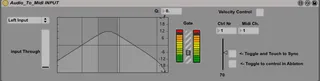
REALTIME Audio To Midi Converter INPUT
This Version has been frozen to make it work REALTIME...
- Type
- Audio Effect
- Author
- diego19187
- Version
- 0.9.2
- License
- None
- Live version
- 9.0.1
- Max version
- 6.1
- Downloads
- 4,769
- Updated
- 2014-05-02
REALTIME Audio To Midi Converter INPUT is an Audio Effect for Ableton Live by diego19187, distributed as freeware, with no license specified by the author. It targets Live 9.0.1 and Max 6.1. On maxforlive.com it has 4,769 downloads. First published 2013-04-05, last updated 2014-05-02. 11 user comments below.
New to Max for Live? Read what Audio Effects do, how device licenses work, how to install a device.
Description
This Version has been frozen to make it work
REALTIME_Audio_To_Midi_Converter INPUT
you need sigmund~
http://crca.ucsd.edu/~tapel/software.html
to make this work!!!
you need the REALTIME Audio To Midi Converter OUPUT
to make this work!!!
Put Audio in, get Midi Out
(With velocity and experimental PitchBend)
a little twitchy but who cares, it's experimental ;)
not really stable yet!!!
Put the REALTIME_Audio_To_Midi INPUT Patch on a monophonic Audio Track or Input you'd like to get as Midi-Stream.
Put the REALTIME_Audio_To_Midi OUPUT Patch on a Midi Track and the Synth/Sampler or Hardware you want to use, behind it.
I recommend experimenting with the Arpeggiatior/Chords/Velocity Midi Devices of Ableton.
This is work in progress.
Any Tipps, Ideas or fixes are welcome!
Cheers!
Comments (11)
Would you have any recommendations as to how to smooth the amplitude data coming to the device's fader? i.e. make the fader less "jumpy" and a bit more smooth?
Why:
I've been looking for a device that would allow me to convert an audio track's amplitude to some kind of midi-capable fader. This is exactly what I needed!
I've mapped the device's fader to a dummy fader on my TouchOSC iPad template, resulting in a sort-of VU meter display.
I'd love for the fader's movement to be a tad more smooth / less erratic.
Any help would be much appreciated. And thank you for this device!
try experimenting with the "line" object. I updated the Audio_To_Midi OUTPUT just now.
Sorry for the late response, this forum doesn't send me any updates somehow.
Cheers
I tried following your instructions (put the INPUT patch on the audio channel, and the OUTPUT patch on the midi channel then a synth), but I can't get the synth to work.
On the audio channel I do see the audio signal arriving to the INPUT plugin, but I don't see anything happening on the MIDI channel.
Are the two patches need to be connected somehow?
Thanks for the help. I'm really new to MAX.
Yuval
However, I did transfer the sigmund files to a separate directory and added this directory to the Search Path (When I go to File Preferences --> List Paths I see it there...)
Any idea how to solve this?
http://cycling74.com/docs/max5/vignettes/core/live_freezing.html
1. I d/l sigmund~ and put it in the Max patches lib which is part of the search dir.
2. I put the input on an audio channel and set it to mono.
3. I put the output on a midi channel
4. I toggled the "Touch to control in ableton" switch.
Nothing seems to happen...I don't even see the audio signal reaching to the Audio input device.
help? :)
Your device is fantastic !!!
Do you think there is a way to use more than one instance per set ?
I would like to have at least 3 channels of audio to make 3 channels of Midi synths.. Is ther any way to achieve that ?
Thank you !
And many thank's for your work !!!
:)
I made a set of 4 devices (input and output) so I can use 4 instances of Sigmund in my set, it's crazy, doesn't consume more cpu ! works far better than the expensive "widi" plug !!!
Thank's so much !
Is it possible to use this device on win7 and how?
Thank's a lot
Kuzma