a better search for max devices
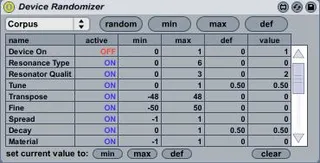
Device Randomizer screenshot

Device Randomizer

by Hanako

you can randomize all device parameters. and you can sele...

View on maxforlive.com

Type
Audio Effect
Author
Hanako
Version
2.0
License
None
Live version
8.1.1
Downloads
21,293
Updated
2010-01-16

Description

you can randomize all device parameters.

and you can select parameters which you want to randomize.

---------------------------------

Update 2.0

Now, you can save this device settings with live set.

Now, you can overwrite min,max,def value by current value.

if you set current value to min and max so you can generate random value between min and max.

for example, you load preset A and set min, next, load preset B using Hot Swap and set max,

so you can generate random value between A and B

Comments (35)

  • lek · January 03 2010
    Absolutely extra awesome!!
  • synnack · January 03 2010
    Brilliant! Thank you for sharing.
  • JuanSOLO · January 05 2010
    I really like this. After opening this thing I was amazed at it's simplicity.
    What make this device only look at the devices in the track where it sits? How does that work?
  • M4LFiend · January 05 2010
    Very nice!
  • wasili · January 06 2010
    thanks for this GEM!!!!!!!!
    exactly what i need for instant remix of sounds in my plugins!
    best,
    Wasili
  • rvaggelen · January 10 2010
    thanks man!
    been looking for something like this.
    Perhaps in the future there will be a random breeder between sound presets A and B, like in reaktor. This produces more usable sounds than a random sound breeder.
    Back in the days when i was working with buzz, Polac Vst Loader had a breed function, which was brilliant. I used it to make a lot of new presets. Been looking for this in ableton since i switched a few years ago.
    cheers and tnx!
    ronald
  • idealist · January 12 2010
    i will download this, could be very useful...
    thanks
  • rvaggelen · January 17 2010
    you da man!
  • du · January 17 2010
    cool 2.0 additions, thanks!
  • dtonshel · February 01 2010
    Great work - thank you! Very useful!
    One thing - when using with a Effects Rack, it's only giving control over the Macros.
  • bobrogue · February 02 2010
    Nice work, you just made me lazier.
  • eeksta · February 04 2010
    this is a gem,thanks
  • offthesky · April 10 2010
    this is so useful! ableton's always needed this kind of simple function.. it'd be super cool to be able to have the values move smoothly when ya hit the random button... (maybe with some kind of line object)
    anyway thanks a bunch!
  • gemail · July 03 2010
    a cool effect, thanks a lot !
  • AETHAERAEL · November 28 2010
    Excellent patch, love it
  • oivindi · December 26 2010
    Trying this in Ableton Live 8.2.2b1, and, unfortunately, it is not working. Will an update be available?
    Seems it isn't working in 8.2.1 either.
  • offthesky · February 15 2012
    this is one of the more useful plugins available. works like a charm for me: win7 ableton 8.2.5, last build of max5 as of jan2012...
  • offthesky · February 15 2012
    btw, would be awesome for version 3 to have 'presets' where you could save various random sets and recall them later... or maybe there's another m4l patch that could work with this randomizer to do that?
  • rs3d · February 18 2012
    For the next version it would be great to save presets and morph between them! Thanks for making this!
  • avielbaz · March 16 2012
    trying to use it and not working.
    can you please send a short instructions how to connect and use.
    [email protected]
  • koldtomek · May 23 2012
    Hanako. Please update your device device - it's on of the best. It's not working on Mac Live Version 8.2.8.
    And that's a big tragedy for mankind.
  • madlab · September 15 2012
    Doesn't work in 8.3.4 neither.
  • quicksound · December 21 2012
    I'd throw in a few bucks to get this back up and running if anyone is interested? Great device.
  • synnack · December 21 2012
    FYI. Live 9 comes with a really good device randomizer!
  • alex808 · March 27 2013
    live 9 randomizer has a limit of 16 parameters...if this could map more than 16 please make a live 9 version :))
  • sam · April 02 2013
    Does some one can explain how to select a device in device randomizer
    Thanks o lot for your help
    Sam
  • xmonsta · September 24 2013
    For those in need, I fixed this device to work with Live 9. You can find that here.
    http://www.maxforlive.com/library/device/1928/device-randomizer-fixed-for-live-9
    Would be great if Hanako could contact this thread and upload it again to this page so its all in one place.
  • simoburro · January 26 2016
    bomb!
  • BVKER · December 13 2017
    This is lit dude!
  • Syn · November 02 2020
    A classic M4L device.
  • mafgar · September 18 2021
    doesn't work anymore ableton 11
  • breadeating · February 13 2022
    It does not work anymore on Live 11. Please update? It would be handy. :)
  • PlatformFour · July 17 2022
    Hi, device is pretty nice - to work in Ableton 11 fix is relatively easy
    1. Open it in Max device editor, exit presentation view, and go into js DeviceRandomizer (usually by double clicking)
    2. in the source code at the beginning of functions device_name_observer and devices_observer add the following
    if(randomizer == undefined){return;}
    3. save under new name just in case
  • 480billion · December 27 2022
    @PlatformFour tryed this but didn't work. Prob. doing something wrong tho.
    be nice if this could get an update
  • lucycates · March 17 2023
    Hi, I'm a student and would appreciate your time if you could answer some questions regarding Max MSP, I've made a form.
    Thanks for your time in advance!
    https://forms.gle/VVPHqm6Aoz6bVZVk9

← Back to search