- Type
- Audio Effect
- Author
- pp
- Version
- 2.0.3
- License
- AttributionNonCommercialShareAlike
- Live version
- 8.2.2
- Max version
- 5.1.8
- Downloads
- 16,372
- Updated
- 2011-05-22
JG.Delays is an Audio Effect for Ableton Live by pp, distributed as Creative Commons Attribution-NonCommercial-ShareAlike. It targets Live 8.2.2 and Max 5.1.8. On maxforlive.com it has 16,372 downloads. First published 2009-12-30, last updated 2011-05-22. 19 user comments below.
New to Max for Live? Read what Audio Effects do, what the AttributionNonCommercialShareAlike license means, how to install a device.
Description
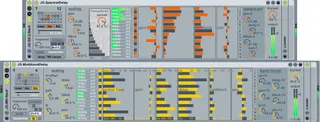
NEW version 2 device with old features bettered and new feat...
Comments (19)
That preset glide thing is awesome too, but if I use longer glides it gets very processor hungry; does that happen with you too ?
I am totally incapable of programming, but do you think it would be possible to make the preset-selection midi-automatable ? In combination with the presetmorphing the idea alone makes me drool.
Sorry just dreaming aloud; thanks once again!
You are working hard & fast man.
Latest version gives me no processed sound, parameters are moving, but only dry sound is audible.
Selecting different quality makes no difference (but seems like an excellent idea!)
ok everyone --- download version 1.4... it actually... WORKS, all of the time. sorry about that. seems i was having troubles with the way m4l reads pfft~s inside of poly~s, and some other silly stuff that happens when freezing / etc.
again, sorry. enjoy. and please feel free to feedback on usage / bugs etc...
thanks
technically it does not matter, but i keep all my devices organised as they are in live / mfl:
1. download from maxforlive.com
2. now move the '.amxd' file, called 'JG.SpectralDelay.amxd', TO your M4L AUDIO Effects folder. I.E. - [your Ableton Library]/Presets/Audio Effects/Max AUDIO Effect/...
3. Start Live and drop 'JG.SpectralDelay' into an AUDIO track... etc...
http://www.lemubaratools.es/2010/03/01/j-g-spectral-delay/
http://www.lemubaratools.es/2010/03/01/j-g-spectral-delay/
version 2 is here, uploaded May 2011. Your bugs/issues are fixed and many new features are added.
Enjoy / let me know how it goes...
- pp .
In Lak'ech
This device is amazing however there is a SERIOUS bug if you upgrade to Max 7.1. Up to version 7.0 it worked. Windows user here.
When you upgrade to Max 7.1 - parameters such as center freq, gain, q, delay, feedback will NOT be recalled inside your project and there is a good choice to blow up your speakers unless you have limiter on master Bus.
I tried everything and there is a workaround. But definitely it is a bug. Don't know is it Max bug or this device bug. Rolling back to Max v7.0 i could load correct project parameters.
I tried every trick which did not worked such as saving specific device as a single ableton preset format, group it in to rack and save it as a rack format but no. After you upgrade to v7.1 it won't recall presets. This worked up to max 7.1. Other max plugins works correctly so i am just guessing it's this device bug not Max bug but i can't claim which one is responsible for issue.
Workaround: you have to use plugin own preset management. So if you are on Max v7.0 you can load project correctly but then you have to do this:
Save your prest (shift-click) in plugin own slot number 1 (out of 32). Then save it as a separate ableton preset. You can save project.
Then after you upgrade to Max 7.1 and when you load project - parameters won't be recalled but remember we saved parameters in slot 1. Just left mouse click on slot 1 and parameters are there recalled correctly. Project will play fine but you'll have to do this (recall parameters from slot 1) every time you load project.
Hopefully developer will look into this. It's such an amazing plugin.