- Type
- MIDI Effect
- Author
- mothergarage
- Version
- 162.0.1
- License
- None
- Live version
- 9.0.6
- Max version
- 6.1.4
- Downloads
- 6,643
- Updated
- 2013-10-24
MultiMapper is a MIDI Effect for Ableton Live by mothergarage, distributed as freeware, with no license specified by the author. It targets Live 9.0.6 and Max 6.1.4. On maxforlive.com it has 6,643 downloads. First published 2013-07-15, last updated 2013-10-24. 35 user comments below.
New to Max for Live? Read what MIDI Effects do, how device licenses work, how to install a device.
Description
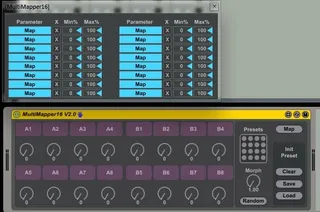
By request a 16 dial version of my MultiMapper device. Map any midi-mapable control to the dials. You can save and randomize presets as well as morph consecutive presets.
Version 1.0.1: Fixed a bug with the automapping index.
Version 1.5: The mapping part is now in a floating window & I reworked the renaming part.
Version 2.0: Added the possibility to set an Init preset with MIDI mappable buttons to clear, save and load the preset. Additional GUI fixes and internal variable cleanup. Therefore versions 2.0 and above are not compatible with older versions - don't overwrite if you have automation in older sets!
Version 2.0.1: Bugfixes
Known issues: Push doesn't correctly display the renamed dials and the crossfader can't be mapped.
Comments (35)
Also, I confirm, dynamic names are not shown on Push or touchABLE.
I confirm, dynamic names are not shown on Push, touchABLE or Novation SL mK2 series
Is it possible to use it within instrument rack (one knob controls a midi function in the instrument selected, next another thing in another instrument selected, etc.) ?
Is it possible to use it within instrument rack (one knob controls a midi function in the instrument selected, next another thing in another instrument selected, etc.) ?
Is it possible to use it within instrument rack (one knob controls a midi function in the instrument selected, next another thing in another instrument selected, etc.) ?
for instance: i have madrona labs aaltos' 16 pitch sliders mapped to the device. and upon placing another multimapper 16v2 on another midi track, the knobs of the second device control the pitch sliders too.
I have two issues that I wish to share:
- Currently dynamic names aren't updated on Push. It's essential for me to actually see what param I am changing.
- It's not possible to assign multiple params to one knob.
Do you think this will be available in a future update?
Thank you again!
I guess enabling multi parameter assignment would clutter and slow down the device. But you could use the original Multimap device which comes with Max for Live Essentials and map it's knob to one of the Multimapper16 knobs.
About updating the names on Push, you say it would break automation. My suggestion here is to warn user via popup when changing name that that will happen. This way we can confirm the change. Most probably I'd do it just once, and after the automation creation :)
Thank you so much and happy new year :)
I'm still considering to add the Push naming feature, but because of a lack of freetime it might take a while, so don't hold your breath.
I am still very insterested in the Push naming feature. I could make a payment if you need so, please let me know!
I'm sorry but I couldn't get it to work, as push doesn't update the display.
Let's hope ableton do an update on this
Thanks for your time anyway!
I got super excited when I saw this, as I imagined it solving the controller mapping problem I have but after downloading it and playing with it I'm not sure if I've misunderstood its intended purpose if I've just broken it.
I was hoping the mappings would update with the presets and that I could have the 16 knobs on my controller mapped to 16 parameters that I need for song A and for 16 other parameters for song B, those parameters being macros, device controls, mixer controls etc.
It looks like the presets only store and recall the control value of the 16 knobs and there is no way to swap mappings with the presets? Is this correct?
I hoped this would be a drop in replacement for a similar M4L patch I found here, that unfortunately hasn't yet been upgraded to work with live 9 / max 6. - http://www.covops.org/max_for_live_collection/
I'd love to have a dynamic controller mapping update with a clip that I trigger in the first scene of each song in my set, something similar to what is demonstrated in this video. - http://www.youtube.com/watch?v=2CcePuhkLCc
If anyone is able to explain how I might do this with MultiMapper16 or any other solution I would finally be satisfied with my ableton live workflow and could die a happy man!
NOTE: I've already tinkered in the MultiMapper16 device and made it compatible with Clip Mapper and it's switching presets when I trigger my mapped clips. I can't imagine how to make it also swap the mappings however :(
Thanks guys.
C.
Thanks.
http://medias.audiofanzine.com/images/normal/evolution-uc-33e-634497.jpg
Thanks
I have an Idea. It is very helpful. The Idea is simple but very useful.
map more than one note (3 to 5) to a clip. You ask why 3 to 5 notes?
Please read This:
http://audiosex.pro/index.php?/topic/12023-multi-midi-note-mapping-vision-or-reality/
thanks in advance
What do you think about swapping the % for absolute 0-127 values, like the knobs show?
I am dying for a slightly edited version, one which would only take in MIDI or CC values if the device is actually turned on. Is this possible to implement?
Thanks so much,
Moses
Not sure if the developer has moved onto bigger and better things, or is still tweaking this one according to feedback, but...
Any way you could get it so that clicking a parameter and pressing delete will bring the mapped parameter back to its original default value, rather than just bringing it all the way down to zero? This would be a huge time-saver for sound design. Thanks!
Only one question.
I have made an ableton project file, with multimapper on one channel.
Everytime I load up the project, the mapper window coming up and have to close it.
Do you have solution to solve this?
Thanks.
@vanKloot: I'll see what I can cook up.