- Type
- Audio Effect
- Author
- mothergarage
- Version
- 1.06
- License
- None
- Live version
- 9.0.4
- Max version
- 6.1.3
- Downloads
- 4,021
- Updated
- 2013-07-15
MultiMapper is an Audio Effect for Ableton Live by mothergarage, distributed as freeware, with no license specified by the author. It targets Live 9.0.4 and Max 6.1.3. On maxforlive.com it has 4,021 downloads. First published 2013-07-06, last updated 2013-07-15. 15 user comments below.
New to Max for Live? Read what Audio Effects do, how device licenses work, how to install a device.
Description
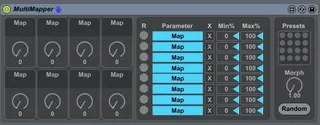
8 dials you can map to any midi-mapable control in Live. Looks like the eight macro devices you usually get. Just a tweaked version of the Multimap device which comes with M4L, so credits go there.
Version 1.01: Added dynamic naming of the dials. Thanks to Lokua.
Version 1.02: Added preset saving and randomizing.
Version 1.03: Added morphing of consecutive presets. Some GUI changes.
Version 1.04: Added possibility to rename the dials.
Version 1.05: Minor GUI changes.
Version 1.06: Fixed automapping index.
Known Issues: Push doesn't display the dynamic names.
Comments (15)
And I don't think it is possible to get names of parameters inside each macro. Will investigate.
i reeeeeally want an updated 16-24 macro device for live 9.
tried making multimapper a 24 macro, but it wouldn't save properly or something. my m4l device skills are nill..
here's a screenshot:
http://sunfalls.org/m/mmapper16.png
+1
It would also be nice if there would be a way to offset multiple targets somehow. eg when controlling filter env sustain + decay slope
Just add this effect to a Instrument Rack and Map 2 Parameters to one Macro :) Event Offsets working this way !
Very Nice ! Thank You VERY much !
eg: instead of 0 to 100, inverse it to 100 to 0
Now I an can enter even inversed ranges :)