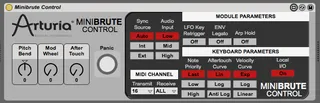
MiniBrute Control
Ableton has always been a pain for controlling external gear...
- Type
- MIDI Effect
- Author
- PatrickDSP
- Version
- 2.0
- License
- AttributionNonCommercialNoDerivatives
- Live version
- 9.1.2
- Max version
- 6.1.7
- Downloads
- 1,269
- Updated
- 2022-02-18
MiniBrute Control is a MIDI Effect for Ableton Live by PatrickDSP, distributed as Creative Commons Attribution-NonCommercial-NoDerivatives. It targets Live 9.1.2 and Max 6.1.7. On maxforlive.com it has 1,269 downloads. First published 2013-07-21, last updated 2022-02-18. 6 user comments below.
New to Max for Live? Read what MIDI Effects do, what the AttributionNonCommercialNoDerivatives license means, how to install a device.
Description
Ableton has always been a pain for controlling external gear. Even though there's not much to control via midi for the Minibrute. I made a quick max4live midi plugin to control pitch bend, mod wheel, and after touch. I even added a nice panic button in case there's ever a stuck note as sometimes is the case with hardware. Have fun automating.
***UPDATE 1.1.0***
Now with better automation scales and better panic button.
***UPDATE 2.0***
Now includes access to all the parameters found in the editor. Firmware 1.0.3 required.
Comments (6)
I have the "Minibrute Control" before an "external instrument (the minibrute)" on a midi track.
But the minibrute does not register the changes I make from the plugin. Any known issues?