- Type
- MIDI Effect
- Author
- hyakken
- Version
- 1.17
- License
- None
- Live version
- 9.0.4
- Max version
- 6.1.2
- Downloads
- 3,688
- Updated
- 2014-06-11
TBseq is a MIDI Effect for Ableton Live by hyakken, distributed as freeware, with no license specified by the author. It targets Live 9.0.4 and Max 6.1.2. On maxforlive.com it has 3,688 downloads. First published 2013-07-23, last updated 2014-06-11. 13 user comments below.
New to Max for Live? Read what MIDI Effects do, how device licenses work, how to install a device.
Description
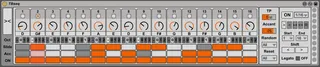
TB-303 style sequencer
For analog four user
you need to set portamento mode to legato for slide effect.
if you emphasize accent effect,better change velocity curve and tweak velocity mod parameters.
Patch description
Left,Right button=shifting all seq data
TP=transpose
Acc=accent level
Rnd=parameter randomize
I used cbm.mono for making slide effect.
http://www.xfade.com/max/examples/
v1.01
changed randomize behavior
v1.1
changed interface little
added some features
"legato button"
If your synth has legato mode turn off this button.
v1.11
fixed few issues
v1.12
added the button to change the interface width
v1.13
changed interface
v1.14
now note length expand and contract based on sequencer speed
v1.15
bug fix
v1.16
fixed save/load issue
v1.17
fixed shifting values issue
Comments (13)
reckon it may use a note quantizer...
1/2-1/128.
this way it may play better with arps as well.
love this indeed
any quantisations below the tbseqs' quantisations
makes outgoing notes stop
so far i dont know how to handle that issue.
if i figure out the solution,i will fix that issue.
Hope you can help me out with this!
---
HI Guys!
I'm using this MAX FOR LIVE APP called - TB303 Sequencer for the ANALOG 4.
The issue is that...whenever I restart the DAW (Ableton Live) all the sequence I 've done in a previous session...is literally gone! It seems like a new sequence is generated once the DAW is restarted.
I've tried saving an ableton preset with the sequence in it...but it doesn't matter. The sequence is never saved.
The only (and damn archaic) method I've arranged to re-open my previous sequence was to take a snapshot photo...and then re-do everything again...but man...this is boring as hell!!
I know I can do it inside the A4 and save it there...but I need to use the MAX DEVICE in this specific case.
Did anyone had the same problem?
How the hell do I solve this?
This is cracking my head apart...
Thanks in advance!
Pedro Goya
sorry for that issue.
i have fixed it.
so please download v1.16 and try it.
thanks
Really appreciated :)
I use your device all the time. Will let you know if the issue remains or if its ok now.
Really appreciated :)
I use your device all the time. Will let you know if the issue remains or if its ok now.
The problem remains.
Some notes are maintained, but repositioned and octaves lower. Some disappeared.
I've made a pretty basic test and uploaded snapshots so you can see what I mean.
This picture was taken as the sequence was SUPPOSED to be (basic sequence):
http://www.pedrogoya.com/Before_Saving.png
After saving the project (and even saving the max device in its current state) when re-opened Ableton...the sequence was close...but not exactly the same:
http://www.pedrogoya.com/After_Saving.png
---
I'm using Ableton Live 9 (Original)
and Mac Osx is 10.7.5 (if it helps for the case)
Let me know if you can help me on this.
Thank you
The problem remains.
Some notes are maintained, but repositioned and octaves lower. Some disappeared.
I've made a pretty basic test and uploaded snapshots so you can see what I mean.
This picture was taken as the sequence was SUPPOSED to be (basic sequence):
http://www.pedrogoya.com/Before_Saving.png
After saving the project (and even saving the max device in its current state) when re-opened Ableton...the sequence was close...but not exactly the same:
http://www.pedrogoya.com/After_Saving.png
---
I'm using Ableton Live 9 (Original)
and Mac Osx is 10.7.5 (if it helps for the case)
Let me know if you can help me on this.
Thank you
I fixed shifting values issue.
Please try again.
Thanks
It seems to be working fine.
I've done the previous tests, saving & re-opening the projects...and it's all there :)
I'll have a most exhaustive work with it tomorrow and will let you know it's behavior.
But so far so good!
Thanks once again :)
It would be perfect if we can store our patterns and recall them as we want. If it is possible, i would love use this in a liveset situation !!
Thanks for your work !