Easy Automation Loops
The feature Live should have always had. A simple tool that ...
- Type
- Audio Effect
- Author
- ryan7585
- Version
- 1.6
- License
- None
- Live version
- 8.3
- Max version
- 5.1.9
- Downloads
- 2,649
- Updated
- 2014-07-02
Easy Automation Loops is an Audio Effect for Ableton Live by ryan7585, distributed as freeware, with no license specified by the author. It targets Live 8.3 and Max 5.1.9. On maxforlive.com it has 2,649 downloads. First published 2013-12-18, last updated 2014-07-02. 1 user comment below.
New to Max for Live? Read what Audio Effects do, how device licenses work, how to install a device.
Description
The feature Live should have always had. A simple tool that works.
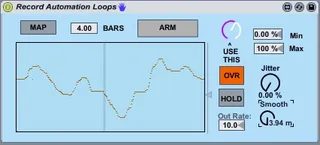
I will upload a more advanced version soon, but this simple little thing has been needed for far too long, and has no bells or whistles to distract you from its simple, useful function: record loops of automation data. Use it in your patches if you like.
Instructions:
-Map the plugin to the desired control
-Type in the number of bars for how long you want the loop to be
-Select "OVR" if you want to continuously overwrite your loop until you press stop, or unselect it to take a single pass at recording the loop
-Press play on the transport
-When you're ready to record, hit "ARM"... and turn the "Use This" knob (or your midi control knob assigned to that parameter) in order to do your thing.
-If OVR is selected, press ARM again to stop recording. If OVR is off, this happens automatically.
And thats it! Now that automation will play in a loop as the track plays, always syncing with the transport.
Thanks! If you find any glitches PLEASE mention them in the comments section. I DO NOT want this to cause problems for people.
-Ryan
[wavedesign]
---
UPDATES:
1/2/2014 -- Improved save functionality. Thank you to user "DO...WHILE" on cycling74 forums for the tip!
4/17/2014 -- Problem with multiple instances, and CPU lag issues: both solved. Max, Min, Smooth and Jitter controls added.
KNOWN ISSUES:
Control knob seems to not want to be mapped to from another LFO device. Working to solve.
Comments (1)
is there a possibillity to reset delete loop data?