Volca Beast - Beats
-Volca Beast- Volca Beast is a midi device for controllin...
- Type
- MIDI Effect
- Author
- RyanRitchie
- Version
- 1.1
- License
- Attribution
- Live version
- 9.0.6
- Max version
- 6.1.4
- Downloads
- 1,032
- Updated
- 2015-07-03
Volca Beast - Beats is a MIDI Effect for Ableton Live by RyanRitchie, distributed as Creative Commons Attribution. It targets Live 9.0.6 and Max 6.1.4. On maxforlive.com it has 1,032 downloads. First published 2014-04-07, last updated 2015-07-03. 7 user comments below.
New to Max for Live? Read what MIDI Effects do, what the Attribution license means, how to install a device.
Description
-Volca Beast-
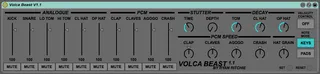
Volca Beast is a midi device for controlling the Korg Volca Beats.
Features:
Re-routes MIDI notes into a single octave range which is playable in any octave and switchable between Keyboard/Piano layout or 4x4 Pad mode (automatically assigned to most 16 pad MIDI controllers including Push, Maschine, MIDI Fighter, etc.).
'Velocity Control' mode which controls the volume of individual drums with their velocity information.
Individual 'Mute' buttons to silence desired drums.
Presets can be saved and bounce all settings into the hardware when loaded onto the track or manually via the 'Set' button (Good for when you changed hardware settings and want to use the software settings again).
'Reset' button for resetting all controls back to their defaults.
Individual volume control (when not in 'velocity control' mode) which are fully automatable.
CC control for all assignable parameters (Stutter Time & Depth, Tom Decay, CL Hat Decay, OP Hat Decay, PCM Speed for all 4 PCM sounds and Hat Grain).
I've put many hours into this to learn M4L so thank you very much for downloading and giving it a go.
Donations are appreciated too.
Please feel free to message me with any questions, ideas or suggestions and I'll be more than happy to respond.
Enjoy!
(version 1.1 fixes a bug that caused incorrect parameter values on load up)
Comments (7)
I could make you a personalised version of the device without the rerouting.
I don't really understand your intentions with this other software but I'd be more than happy to. Just shoot me an email and I'll reply with the edit. My email is inside the device if you open it for editing.
Thanks for the download!
-Ryan
I could make you a personalised version of the device without the rerouting.
I don't really understand your intentions with this other software but I'd be more than happy to. Just shoot me an email and I'll reply with the edit. My email is inside the device if you open it for editing.
Thanks for the download!
-Ryan
I have a problem with it though - it's probably me who do something wrong, but:
When I load Beast on a blank midi track, and afterwards load a blank drum rack, then the triggered sounds doesn't correspond with the pads I'm hitting on Ableton Push. I have Beast set to "Pad mode". Fx if I hit the second pad on Ableton Push then it doesn't trigger C#1 but F#1 instead, which mean I can't have the sounds arranged in a useful way on Ableton Push. Am I doing something wrong or can this be fixed?
Hope you understand the question. Thanks in advance, and for your work!
Frederik
Firstly, thanks a lot for the download.
Now I totally understand your problem.
See, when I made the device I didn't have a push and assumed that you could use the drum sequencer without a drum rack on the track.
My device reroutes MIDI notes so that they are comfortable to play. I could make you a personal update which would bypass the rerouting.
Send me an email.
Cheers
-Ryan