- Type
- Audio Effect
- Author
- jonasobermueller
- Version
- 1.5
- License
- Attribution
- Live version
- 10
- Max version
- 8
- Downloads
- 2,411
- Updated
- 2019-03-06
jo.Locators is an Audio Effect for Ableton Live by jonasobermueller, distributed as Creative Commons Attribution. It targets Live 10 and Max 8. On maxforlive.com it has 2,411 downloads. First published 2014-04-22, last updated 2019-03-06. 15 user comments below.
New to Max for Live? Read what Audio Effects do, what the Attribution license means, how to install a device.
Description
Missed this feature in Ableton Live for quite some time so I programmed a solution in M4L.
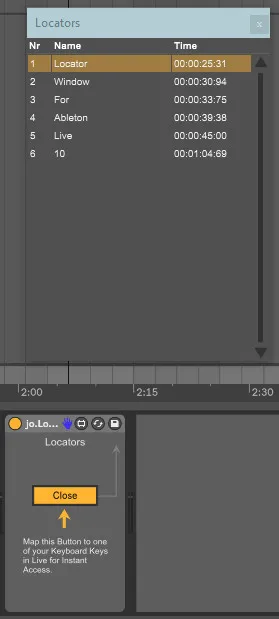
A floating window that automatically updates and shows you all the Locators you created in a session in organized order by time. Also, let's you select locators and have the play-cursor jump to them depending on your global quantization.
--
Update 1.5: Fixed some issues that made the colors not update correctly when using the device in Live 10. The table should now change color again automatically when switching Lives theme. Renamed Device to Locators.
Comments (15)
Thanks!
But, is there a way to sort the locators by time ?
That wold be great.
Atb
1. Export List as seen in the panel to a *.TXT file
2. Export Locator List to compatible *.CSV file for import into Adobe Audition ?
3. (extra) import of locators from *.CSV file (the one exported for Audition)
And it seems to be perfectly stable on my M1 pro running Ableton Live 11.2.10.
I don't get some commentaries about the way the locators are sorted out.
To me, they appear depending on their position on the timeline, and it's the most logical way : I want the intro before the first chorus and the coda after the 2nd chorus (that is after the first chorus). If I create the intro locator at the end of the mix session, it still appears first in the device, as it appears first in the timeline...
But maybe I didn't get their issues...
As an exemple, I inserted jo-locators in a Live session where I had already plenty of locators, they went in the correct order, but when I added another one at the complete end of the track, it put it in the second place.
I don't get it exactly.
It could be an amazing device if it could respect the order of the locators in the timeline, because it's of course what makes the most sense...
Thanks!