a better search for max devices
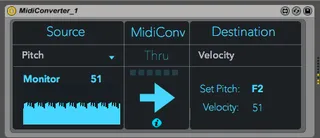
MidiConverter screenshot

MidiConverter

by animatek

Version 1.0 - added a control in pitch to latch veloc...

View on maxforlive.com

Type
MIDI Effect
Author
animatek
Version
1.0
License
AttributionShareAlike
Live version
9.1.7
Max version
7.0.1
Downloads
5,533
Updated
2015-02-25

Description

Version 1.0

- added a control in pitch to latch velocity

- added a duration note in pitch output

- added a control in Velocity to latch pitch

Features:

Midi Converter allow to convert any Midi Parameter:

FROM:

- Pitch

- Velocity

- Control Change

- After Touch

- PitchBend

TO:

- Pitch

- Velocity

- Control Change

- After Touch

- PitchBend

- Map any Parameter

- Added a Preset and correct some issues

TODO:

Add OSC to Source and Destination.

Comments (16)

  • bennniii · June 11 2014
    cool idea!
  • herrprof · June 12 2014
    looks great please add more presets and multiple rules!!
  • Anivia · June 12 2014
    very useful
  • jeffromusic · June 14 2014
    There should be an envelope function for the velocity section. Or a latch mode or something. It doesn't work very well when you try to map velocity to a dry/wet knob for example because it goes right back to 0 when you let go of a key
  • audiojet · June 15 2014
    I agree with the last post. With Velocity, the amount should remain on the last monitored value when key pressed instead of resetting to one each time. This feature would be very useful as far as velocity is concerned. Thanks for the plugin.
  • c2001 · January 04 2016
    Thanks for posting.
    Tried it to convert a CC# into another CC# but it doesn't work, ie the CC# coming in is the same as the CC# coming out, any idea why ?
  • c2001 · January 04 2016
    it doesn't work whatever the source, what comes out is always what comes in.
    am I using it wrong ?
  • c2001 · January 07 2016
    OK I understand, I need a second midi track to actually receive the transformed data.
  • EarHax · May 21 2016
    per @jerrfomusic and @audiojet, I took the suggestion and ran with it and modified the device to add a switch to filter out MIDI note off messages from velocity data. You can grab the updated device here.
    http://www.maxforlive.com/library/device/3641/midiconverter-1-1
  • voodoohop · September 21 2016
    It's polluting my undo history for some reason. anyone got a solution>?
  • techbuzz · March 12 2017
    Am I missing something? This device does not convert anything to CC. I tried a simple PitchBend to CC1 and it doesn't do anything but pass the pitchbend data through.
  • KingOfThePee · March 18 2017
    Hi.
    When I try and use this to convert pitch to velocity it also triggers a note on the note off command, any ideas of how to solve this?
    I tried the version with the switch posted above but the same thing happens.
    Thanks, P.
  • moviehdapp · December 15 2017
    Great one, keep going.
  • ludicrouSpeed · September 25 2018
    Thanks I'm excited for this
  • Cocker · December 06 2019
    There is no Pitch Bend Wheel on my controller so I tried to map CC from another knob to Pitch Bend. It doesn't work
  • xav · April 22 2021
    It seems great. But I didn't manage to convert Cc to pitch... and I don't understand very well this max4live device, especially the middle partwith 6 squares and the arrow

← Back to search