- Type
- Audio Effect
- Author
- pp
- Version
- 0.9
- License
- None
- Live version
- 8.1.1
- Downloads
- 3,977
- Updated
- No Updates
Anti-lope is an Audio Effect for Ableton Live by pp, distributed as freeware, with no license specified by the author. It targets Live 8.1.1. On maxforlive.com it has 3,977 downloads. Published 2010-03-17. 12 user comments below.
New to Max for Live? Read what Audio Effects do, how device licenses work, how to install a device.
Description
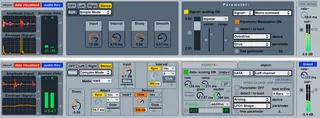
Envelope follower with shaping controls converts to Parameter Modulator with scaling controls + more...
Full documentation included in device.
sort of an adjunct to my other device 'gLeechFOs' (http://www.maxforlive.com/library/device.php?id=245).
let me know any bugs / thoughts as ever...
Comments (12)
not a dumb question. and good point. and cool idea. the answer is... yes... i THINK so.
if i was doing this myself i would build a very simple m4l device with a live.slider that was enabled for parameter control from 'Anti-lope'. i would map this for 0. - 1. float operation, and on its output i would put a threshold control (for example, a [> 0.5] object). then i would map this flag (via [sel]) to send to the looper button. i presume that the looper button takes 127 as 'on', although i haven't checked (i'm away from my live computer at the moment), so [sel 0 1] bangs a 0 and a 127. ignore the 0? this needs to then go to your own parameter control so you can map it to the looper.
however, maybe it need not be that complex. maybe i can provide a "bang 127" output option on the next version for you. i'll see how it goes. i cannot provide midi out (that would be the simplest) because of the inherent limitations of audio devices in live.
anyone have any other ideas?
best.
i guess i should not have replied so quickly to the above. back at my live computer, i just successfully used 'Anti-lope' 0.9 to control the 'Looper' button. i haven't really used looper much, but my oversight is embarrassing anyway! parameters are ready mapped with my system!
open a set. drop looper on one track and anti-lope on another. in the parameter control drop-down menus in anti-lope choose looper as the device and 'state' as the parameter.
the audio material you feed the anti-lope with is key, as are the anti-lope settings. i just successfully had a two bar drum loop turning the looper button between play and overdub on the kick downbeat no problems. the settings with a drum track feeding anti-lope should be high 'input' and 'sharp' values, low 'interval' and 'smooth' values - this gives short sharp bursts of energy to the parameter and the looper button triggers when there is a peak that reaches the top. some smallish scaling values pre-parameter helps of course.
hope that helps.
of course for more finesse and control (like simulating double-clicks on the looper button) you would have to roll your own OR feed it with some absolutely perfect audio material pre-designed with attacks in the right places i presume. Or make some very clever automations to 'Anti-lope' (very possible actually).
enjoy.
i'll do better documentation for the full 'version 1'. in the meantime...
an envelope follower 'listens' to an audio signal and translates that into usable data. in 'Anti-lope' that data can be sent to other effects parameters in your set to control them. therefore, as a very simple example, if i put a drum loop through it i can make this control the gain level of a utility device, so, every time the drum is 'loud' it will send the gain up loud, every time the drum loop is soft it will turn the drum utility gain down.
to best understand it it is worth trying this simple experiment: load an audio drum loop on to an audio track. then load a 'utility' device onto that track. then load 'Anti-lope' onto that track BEFORE THE 'UTILITY' DEVICE. then in 'simple mode' map the 'parameter' controller (using the menus) to the utility gain you loaded earlier. now play your drum loop. the crucial thing here is to play with the 4 controls - input: this is how much level you will send to the envelope following device / interval: this is how fast the follower will work (shorter times = faster) / sharp + smooth: these affect the shape of the envelope data - a bit like a compressor - sharp is the 'curve' effectively, smooth is like fade time.
if you play with these controls whilst attached to the utility gain you will immediately hear the differences - jumping or sliding the utility gain.
once you can do this, you can do anything else with this device.
hope that helps for now.
could you send me these bpatchers or maybe update your device? same for the Gleechfos (same problem)
thanks in advance
glad to hear you have been using these things.
yes, live 8.2.2 + 5.1.8 not only broke quite a few things but also rendered some patching (workarounds) superfluous. however, some of it is to do with the new <empty> message - if you search the ableton m4l forum you will find a set of downloadable abstractions as a fix - these will apparently be included in max 5.1.9 or above.
with regards the bpatcher issue - just click the unfreeze button on the device (after opening in edit mode) and all 'frozen' subpatchers (including the bpatchers) will be unpacked to a folder on your desktop. you can edit everything from here. make sure you 'save as' on everything and manage all your path dependencies properly.
at the moment i am about 80% through a massive update/remake of my 'gLeechFOs' device which addresses all these issues and much much more. watch this/that space. i will get to work on 'Anti-lope' shortly after that.
in the mean time, there are envelope-following to parameter-control devices, and lfo's of course, included with the 8.2.2 / 5.1.8 updates, by manuel poletti, which are excellent of course.
hope this helps for now at least...
Stuff like adding tiny bit of reverb/filtering/freq shift when vocals goes a bit loader sounds unbelievably cool.
thanks for any help or advice, i came across this plug in hope that it would be capable of doing so...