AuDi -audio to midi synth-
Monophonic audio input to Midi audiounit synth. (OSX only)...
- Type
- Audio Effect
- Author
- Crampe
- Version
- 1.1
- License
- None
- Live version
- 8.1.1
- Downloads
- 8,364
- Updated
- 2010-03-27
AuDi -audio to midi synth- is an Audio Effect for Ableton Live by Crampe, distributed as freeware, with no license specified by the author. It targets Live 8.1.1. On maxforlive.com it has 8,364 downloads. First published 2010-03-23, last updated 2010-03-27. 21 user comments below.
New to Max for Live? Read what Audio Effects do, how device licenses work, how to install a device.
Description
Monophonic audio input to Midi audiounit synth. (OSX only)
Put it on an audio track.
Select a synth plug-in from the umenu.
Plug your guitar, bass, voice or whatever is audio.
Play.
Version 1.1:
-You can now choose between au. and vst.
-Knob for analysed audio frequence threshold tweeking.
I've freeze the device but I'm not sure I've did it well.
So, just in case:
You'll need sigmund~ and audiounit~ externals.
For sigmund~ :
http://crca.ucsd.edu/~tapel/software.html
For audiounit~ : http://cycling74.com/forums/topic.php?id=25316
Comments (21)
Its purpose is not to midi out anything.
The monophonic source pitch is converted tp midi note, and then it is sent to the loaded plug-in.
When you load the patch, it should automatically browse your component folder and list your audiounit plug-ins.
Just select a synth in the umenu.
Now if you click the open/close button, your plug-in window should open.
You can now play the synth with your guitar or whatever monophonic source.
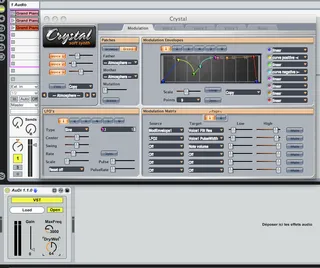
It works for me, I can load all my synths (as you can see on the picture with an example of an instance of Automat loaded).
Have you tried to open the device and refresh the "getplugins"?
I like the "CV to MIDI" kind of and hope you figure out what could be the problem. Wish you well, John.
So maybe that's an explanation.
For now you are 2 persons / 37 downloads who have problems. We don't know if it works well for the others.
However, I'll make a version using the vst~ object soon to see if you can get better result. Or maybe you can try by yourself.
Let me know if you do it.
Thanks
It will be great to have something polyphonic though.
Do you think it will be possible?
Thanks in advance.
But they are supposed to be with the file I've provided (thanks to the freeze function). If you open the device, can't you see the audiounit~ object and the singmund~ one (this last one is the AudioToMidiMono patcher)?
I didn't try the Sonnus, but I've read that it's a great tool with almost no latency... and my patch as a noticeable latency.
Actually I've just made it the day I've post it here and it needs improvement, mostly regarding the pitch detection accuracy.
I'm starting to look at what is possible with polyphonic pitch detection, but I'm a new max user and I have a lot of things to learn.
Ok thanks, I have managed to make it work, I can see my audio unit fx and plug in synth, later on I will plug my guitar and try it out.
Yeah man, I don't know f..... all about Max, so don't worry , if you can improve it will be great, take your time, no hurry.
It's not an easy task to achieve ( audio to midi converter) anyway maybe some Max expert can help you out with this.
I'll wait for an upgrade, many thanks again.
I will let you know about latency.
"
For building standalones...
audiounit~ uses the sqlite database extension to maintain the cache of scanned plug-ins. So you need to include the sqlite extension in your application bundle (look in Cycling '74/extensions).
"
http://cycling74.com/forums/topic.php?id=25316
i presume this means you have to freeze the 'sqlite.mxo', into the 'dependencies' of the device as well for mfl users to get it to work?
just a thought, two cents.
could be really usefull using guitar or voice to play synths.
Is it possible to make it just send midi notes to a midi track and then record or play?
Okay so I have max for live installed and working.
I put a microphone on channel one.
I downloaded your AuDi 1.1.0.amxd and dragged it into ableton.
I dragged it to track one.
I downloaded crystal soft synth, tried everything but cannot get it going.
installed dmg file. then it goes to a pkg file, which i installed successfully.
But now i have no idea where the synth is located in order to start it.
However i followed the website's instructions to download and saved additional fxb files under library, app support.. and created folder called Crystal, CrystalPatchBanks and CrystalSoundFonts.. as per instructions..
But never mind the Crystal soft synth, I managed to download another VST synth called Ticky Clav.
(can your program be run within Ableton, or do I have to have a VST synth?)
So anyways I found Tick Synth under my plug in folder, and double clicked it.
But now I don't know what to do, or how to set up the channel to send the mic to midi info to the VST synth.
I set up the channel exactly as your picture.
Can you give me any help?
I opened up your patch in Max and saw that the audio was converting to midi just fine (represented by the keyboard notes appearing)..
So how can I get it to make sounds?
Your help is greatly appreciated..
note to noobs.. you have to download a vst instrument to make this work..
Kinda negates the time and expense i've put into tweaking all my delicious patches in Ableton and outboard gear.
Anyways..
Now that it's working.. too bad about the latency.
Otherwise great!
Can anyone tell me how to add a dials to do the following customizations:
1. Octave. To make the device send midi notes that are up or down by a set amount of octaves. Or you could do individual notes I guess.. I'd rather be able to make it in octaves.
2. set range of input and output - to set the lowest and highest note input and the lowest and highest notes output.. Let's say i'm putting a mic on a block of wood, or drum skin.. where your exact pitch tracking will happen in a very small range.. say a half-octave. But say you want it to trigger midi notes that span like.. FIVE octaves.. that would be cool. get it?
3. chance. Could you randomize the pitch selection? Or have degrees of randomness?
4. scale type. also before randomizing, maybe you could select what type of scale tones to choose from. Let's say choice one would be pentatonic.. the other a blues scale, the other the major scale, minor, arabic.. etc..