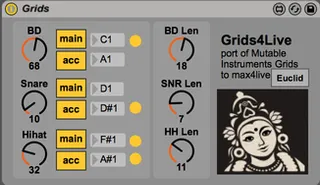
Grids for Max for Live
Grids (http://mutable-instruments.net/modules/grids) is a to...
- Type
- MIDI Effect
- Author
- mots
- Version
- 1.6
- License
- None
- Live version
- 11.3
- Max version
- 8.2
- Downloads
- 14,822
- Updated
- 2024-01-09
Grids for Max for Live is a MIDI Effect for Ableton Live by mots, distributed as freeware, with no license specified by the author. It targets Live 11.3 and Max 8.2. On maxforlive.com it has 14,822 downloads. First published 2014-09-21, last updated 2024-01-09. 37 user comments below.
New to Max for Live? Read what MIDI Effects do, how device licenses work, how to install a device.
Description
Grids (http://mutable-instruments.net/modules/grids) is a topographic drum sequencer module from Mutable Instruments.
This device is a port of the Eurorack version to M4L. Most of the original manual ( http://mutable-instruments.net/modules/grids/manual ) applies, with exception to of course cv inputs, clock in, tap tempo and such thing which do not make sense in a DAW.
Make sure to automate the parameters with automation or with a max4live LFO, that is where the fun begins!
- Compatible and tested with m1 macs
- Compatible with Ableton Push (not in standlone mode tough). Push supported based on https://www.maxforlive.com/library/device/9793/grids-4-push
License : released under GPL 3.0
Comments (37)
comments/help welcome !
There seem to be some sync issues but I'm hoping they can easily be resolved.
Thank you in advance!
this is fixed now. thanks for the report
Thanks a lot! Really love this device.
Q: Did the original Grids transition to other meters, or remain in 4/4?
The Euclidean toggle is greatly appreciated btw.
One thing that might be nice is if the main and accent toggles were visible to midi range. That way a single button could either go through a range of combinations or the same assignment could toggle the acc and mains entirely, effectively allowing an alternative kit or just an accented fill. I find that unless Im just beefing up the same hits and Ive found a really nice pocket for the sound, the accent button doubles up the mains even on the downbeat and gets a bit overplayed.
Still nothing short of brilliant
i suppose that does not belong in grids and should rather be done in another max4live device.
I have a little bugglet: When you use the skin DISCO you cannot see the note numbers as you are changing them. Other skins do not have the problem.
Looking forward to the update.
What I meant by the range, was in the MIDI assignment list in Ableton, due to my own M4L incompetence, I can't invert the range on the main acc buttons. If I could, one button could instead of adding a fill pad, could replace the mains with the fills entirely.
Unless, I'm intentionally doubling up a kick for example,
I find that having the fill on for the pattern at all times sounds pretty exhausting for most sounds. In part, I think this is because the fill is also adding to the down beats, and is being evaluated every single measure (so it accents a bit more than an occasional fill.)
I'd rather give myself two separate 3-piece kits entirely by toggling a button (all toms for example) and use the alternate set as a fill, not an accent.
http://www.samplepacks.ca/how-to-use-the-choke-feature-in-abletons-drum-rack
Good to hear from you
patch doesn't seem to be working correctly in Live 9.2 with Max7 - just wondering if this is me or something to do with the update? Really interested in trying this out if possible - thanks!
The issue is I don't seem to be getting varying midi data when turning the dials to get different patterns or fills.
Cheers.
not sure what it could be
cheers
I'm curious: what is the resolution of patterns on the x/y grid? I tried a more critical listen and it seems like both axis go through just a few boundaries where the rhythm changes; maybe 4 to 6 each. Is that correct? So there really is a fairly finite (16 to 36 or so) resulting rhythms that cover any quadrant of the grid. Would that be the story?
my trial licence of visual studio expired. so i cannot re-build it. anymore :/ shame.
if someone wants to give it a shout, feel free ! the code is on github.
Each step of a pattern is an 8 bit-value that encodes the "height" of the terrain at the coordinate in the map. The density parameter works like a sea level setting, i.e. it defines a threshold where the terrain becomes visible/audible. The height of the terrain is additionally modified dynamically by a random value.
I couldn't find any indication of how the array of static patterns was chosen or generated. That would have been very interesting, because the Mutable Instruments product page mentions "a healthy dose of machine learning and graph algorithms, megabytes of drum loops, hours of intensive computations".
@mots VS Community Edition is now free. I don't have time to try this, but another idea would be to use emscripten to port the code to javascript and get rid of the external.
Mine doesn't seem to record MIDI though when I send the triggers to a different MIDI track, when I hit record on that track no notes are recorded, even though the sliders show MIDI coming through. So strange. Any ideas why?
unfortunately doesnt work on apple silicon in native mode
(tested on ableton beta 11.1)
Unfortunately, it doesn't work since I upagrate from Os el capitan to High sierra :'(
Is anyone have any idea to fix this problem?
I tried to reinstall Ableton and max, bue it hasn't fixed the problem..
I can pu the module on a track but no midi note is sent from the module.
Thanks to read me, schuuss
maybe the issue is that you are on m1, i dont have a m1 mac, and never could compile the source for m1
Great device! thanks! Not sure if you're still maintaining it but the 'Chaos' parameter doesn't seem to do anything on Live 11.3.22, running on apple M1 pro. Still lots of fun without it though and everything else works fine!