- Type
- MIDI Effect
- Author
- IcaroFerre
- Version
- 1.0.1
- License
- AttributionNoDerivatives
- Live version
- 9.1.5
- Max version
- 6.1.8
- Downloads
- 772
- Updated
- 2014-09-23
Rocket Pilot is a MIDI Effect for Ableton Live by IcaroFerre, distributed as Creative Commons Attribution-NoDerivatives. It targets Live 9.1.5 and Max 6.1.8. On maxforlive.com it has 772 downloads. First published 2014-09-22, last updated 2014-09-23. 5 user comments below.
New to Max for Live? Read what MIDI Effects do, what the AttributionNoDerivatives license means, how to install a device.
Description
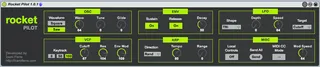
A simple and clean editor for the Waldorf Rocket synthesizer.
Yeah, there are already many other Rocket editors available however none of them managed to do everything that I needed so I decided to make my own.
Rocket Pilot is super simple and straight-forward. The layout and design are similar to the actual hardware.
I've also added some options that are only available via MIDI CC such as the Vibrato Mod Speed / Amount.
The Send button is useful for sending the position of all the parameters at once to the synth.
Have fun!
Icaro Ferre
http://icaroferre.com
http://spektroaudio.com/
--------------------------
Changelog
1.0.1:
- Added bi-directional MIDI CC communication. This should work without creating MIDI feedback loops regardless if Local Control is turned on or off.
- Removed the Mod Amount knob since it can be easily accessed via a Mod Wheel or a MIDI CC #1 and I needed some room on the GUI for the MIDI CC Mode button.
- Local Control switch now works
- Fixed the color of the sections titles (OSC, VCF and etc). Some elements will still look a lil bit different when using other Ableton themes. I'll deal with those in future updates.
OBS: Keep in mind that, if the MIDI CC Mode is set to Bi-Directional, the hardware controls will still work even if the Local Control is off since the hardware controls will be controlling the M4L device which then controls the synth parameters.
If you want to completely kill the hardware controls make sure to turn off Local Mode and set MIDI CC Mode to Uni-Directional.
1.0:
- Initial Release
Comments (5)
A few minor problems that I noticed:
- The Local Off doesn't seem to work here or I'm doing seomthing wrong. If activated I can still change all parameters on the Rocket itself.
- The other Rocket editor here on maxforlive.com works bi-directional if the Session Recording is armed which is quite handy.
- The text color of the sections (OSC, ENV etc.) are white on green when used with a dark skin like 'Disco'. Ok, that one is easy fix :)
TY!
Yeah I don't really understand why people don't add a SendAll button to their own editors. It's one of the reasons why I decided to make my own.
So, I added 2 way communication. I didn't add it in the 1.0 version because I was afraid it'd cause a MIDI feedback loop however I found a way to make it work (at least I think so).
Local Control should work 100% now as well.
As in regards to the color of the objects., I don't really fully understand why that happens. Sometimes, even if I manually set all the colors of an object, Max will still change them to match the theme. I'll try to do some research but I guess I'll tackle this problem later.
Cheers!
The Waveform indicator seems to be reversed. When I switch to square on the rocket the saw lights up and vice versa.
Can you reproduce this behavior?