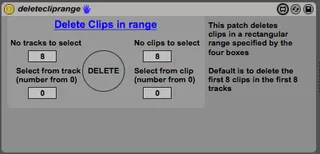
Delete Clip range
The patch selects a range midi clips and deletes them using ...
- Type
- MIDI Effect
- Author
- kenders2000
- Version
- 1.0
- License
- None
- Live version
- 9.1.5
- Max version
- 6.1.8
- Downloads
- 987
- Updated
- No Updates
Delete Clip range is a MIDI Effect for Ableton Live by kenders2000, distributed as freeware, with no license specified by the author. It targets Live 9.1.5 and Max 6.1.8. On maxforlive.com it has 987 downloads. Published 2014-10-03. 15 user comments below.
New to Max for Live? Read what MIDI Effects do, how device licenses work, how to install a device.
Description
The patch selects a range midi clips and deletes them using one midi mappable button.
I made this I make live loops on the fly, build up a number of clips for a song, then when I perform a new song i need to pick up the mouse select and manually delete clips, which is annoying. This patch lets me delete a range of clips using a button on my launchpad.
Comments (15)
With Ableton 10 it was showing errors when trying to delete clips in empty slots, so I updated it. Where can I send you the updated plugin? My email is booking[at]qbxmusic.de
interested to have the updated device too !
here is my mail without the "666" :
[email protected]
thank you !
Interested to check the updated version.
Here is my e-mail:
[email protected]
Have a nice day!
I'm interestet in the newst version.
Could you send it to [email protected] ?
That would be awesome.
All the best!
My improv/loop section of my live set is now able to have 1-button to clear the whole 8x7 grid. (Yes, 8x7 cause 8x8 I couldn't make work - but 7 is more than enough scenes/per song.
I wanted to start on track 14 and clear till track 21 - also to clear scenes 1 through 7.
Here are my settings to make this work:
8 - 'No tracks to select'
8 - 'No clips to select'
13 - 'Select from track (number from 0)'
0 - 'Select from clip (number from 0)'
It is easily midi mappable.
I would have gladly paid $10 for this each to use app.
I've wanted this for years and didn't find it until 15 years after its release.
Thank you!