- Type
- Audio Effect
- Author
- Namihei
- Version
- 1.4.1
- License
- None
- Live version
- 8.1
- Downloads
- 992
- Updated
- 2010-04-19
Nemo is an Audio Effect for Ableton Live by Namihei, distributed as freeware, with no license specified by the author. It targets Live 8.1. On maxforlive.com it has 992 downloads. First published 2010-04-14, last updated 2010-04-19. 6 user comments below.
New to Max for Live? Read what Audio Effects do, how device licenses work, how to install a device.
Description
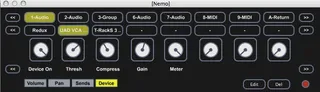
Nemo assists workflow for MacBookPro users
select track or device : cursorover
change parameters : two fingers scroll
I made on MBP 15" (late 2008)
I don't know it works on your MBP
set a file path for the parameters map in the patch editor
--ver.1.2
now automatable
--ver1.3
added mute,solo,arm for selected track (mappable)
--ver.1.4
added select(scroll) and fire scene or clip
(US key)
left command key+scroll : slower
left alt/option key+scroll : faster
Comments (6)
thanks for that