- Type
- MIDI Effect
- Author
- ndivuyo
- Version
- 1.0
- License
- None
- Live version
- 9.1.6
- Max version
- 6.1.9
- Downloads
- 4
- Updated
- No Updates
seQ is a MIDI Effect for Ableton Live by ndivuyo, distributed as freeware, with no license specified by the author. It targets Live 9.1.6 and Max 6.1.9. On maxforlive.com it has 4 downloads. Published 2015-02-02.
New to Max for Live? Read what MIDI Effects do, how device licenses work, how to install a device.
Description
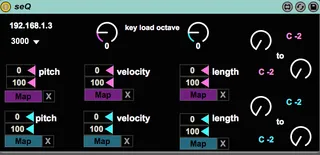
seQ is a max for live sequencer managed by a lemur layout that connects to m4l via OSC so not really any setup (you need lemur!). I made this as a simple, effective and versatile sequencer.
watch video to see what seQ is and does:
http://youtu.be/yuPW6XaAyTw
The video is long, but that's because I do a walk through later in it, just watch the first few minutes to just get a feel.
You have two groups of sequencers that can either send information to parameters, or as midi notes or both! and you can mix and match. I did some work with canvas to have some custom buttons and a custom range for the loop of the sequencers.
This is also a decent example of doing sequencing in max for live with the live.step object with lemur, so if you use Ableton and want TIGHT and diverse sequencing, this is one good way and draw from it for your project.
*** important: AFTER you set it up:: 1) load some different presets, and 2) click the mapping buttons (the drop down menus for the pitch/length/velocity/seq1/seq2/etc). Do these two steps so that everything in the patch is in-sync with the layout
This is a precursor for a project I will release soon that adds a whole-nother dimension to this (kind of experimental) so if you like this, just a wait a little longer for that project: seq[seq]
questions/requests/comments/etc-- [email protected]
more-- cargocollective.com/integrate