Electribe2 Pattern Editor026
Electribe2 Pattern Editor version 026 The Electribe2...
- Type
- MIDI Effect
- Author
- xanadu
- License
- None
- Live version
- 9.1.6
- Max version
- 6.1.9
- Downloads
- 4,197
- Updated
- 2015-03-01
Electribe2 Pattern Editor026 is a MIDI Effect for Ableton Live by xanadu, distributed as freeware, with no license specified by the author. It targets Live 9.1.6 and Max 6.1.9. On maxforlive.com it has 4,197 downloads. First published 2015-02-08, last updated 2015-03-01. 15 user comments below.
New to Max for Live? Read what MIDI Effects do, how device licenses work, how to install a device.
Description
Electribe2 Pattern Editor version 026
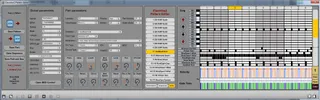
The Electribe2 Pattern Editor can be used to bring patches (parts) and sequences of various Electribe2 patterns together in new patterns. Editing of sequences is also possible. You can use your Electribe2 now for turning the dials. A Launchpad (original, S or mini) can be used to edit the sequence.
Version 026:
- MIDI support for Electribe2 dials
- MIDI support for Novation Launchpad for the sequencer
- View selector: Parameters, Sequence or Wide
- Open- and Save Dialogs
- Layout changes
- Bugfixes
Version 018:
- Number display for Gate Time and Velocity edit
Version 016:
- Added a Windows stand alone version for MAX 6 (runtime)
Version 015:
- Added editor for sequences
- Added grid for 8 drum parts
Version 012:
- Added editing of the Part Parameters.
Version 011:
- Added editing of the Global Parameters.
Version 010:
- First release. Loading and saving of .E2PAT files works, loading and saving of parts and sequences is also possible. This is the minimum functionality to let this editor work as a librarian.
Next step:
- MIDI IO to Electribe2
The working is simple. First you have to drop an E2Pat file (exported from the electribe2). You can select a current part by clicking on it's name. Then it is possible to save the current part or the current sequence or a combination of them to disc. This way you can create a library of patches (parts) and sequences.
To create a new pattern you have to load an .E2PAT file as a starter. Then you can Select parts and drop parts and sequences from you library. Then you save the new .E2PAT fale and import is into you Electribe2.
Of course the Electribe2 Pattern Editor is freeware. All sources are included.
Please feel free to comment on this and make suggestions for improvement.
Electribe forum:
http://www.korgforums.com/forum/phpBB2/viewforum.php?f=48
Comments (15)
What do you think about a Random switch in the program ?
Switching some parameters randomly to generate some new sounds :)
Hipe you answer :) Greetings !
I habe a question: Where did you get any documentation about the *.e2pat files from?
Is ther any doc online available?
Thanks in advance,
joeschman
Would you have some pointers/suggestions as to where I might need to change the code?
Thank you for creating this tool, however what is missing and really needed is an app that can load .e2sallpat files and allow you to drag and drop them in different positions and order.
I would gladly pay for something like this.
@Xanadu I can help you with the interface or whatever you need. Seriously!
Thank you.
Mateo.
Any chances that we can edit .e2sallpat files (instead of just .e2pat)?
(praying).
Thanks.
spacy
Thanx
Nifty device but it doesn't seem to be working for me.
When I edit a part it just reverts back to original. When I try to save a part or pattern it never saves any adjustments. Any ideas?
It's a good way to get to know the settings rather than just copy them over blindly.
Thank you xanadu.