Tremor Drumrack for Push
This is a drumrack for Fxpansions Tremor drumsynth. Each Pad...
- Type
- MIDI Effect
- Author
- mothergarage
- Version
- 1.0
- License
- AttributionNonCommercialShareAlike
- Live version
- 9.1.7
- Max version
- 6.1.9
- Downloads
- 3
- Updated
- 2015-02-22
Tremor Drumrack for Push is a MIDI Effect for Ableton Live by mothergarage, distributed as Creative Commons Attribution-NonCommercial-ShareAlike. It targets Live 9.1.7 and Max 6.1.9. On maxforlive.com it has 3 downloads. Published 2015-02-22. 6 user comments below.
New to Max for Live? Read what MIDI Effects do, what the AttributionNonCommercialShareAlike license means, how to install a device.
Description
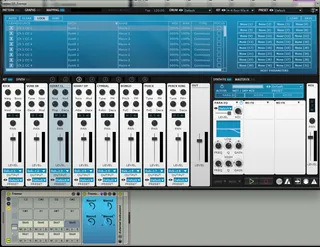
This is a drumrack for Fxpansions Tremor drumsynth. Each Pad represents a slot in Tremor with its own audio output and a Max for Live device mapped to the four macro controls.
You will have to load the included MIDI mapping preset and have to set the outputs of the slots to Sub Output 1-8. Then save this as your default preset.
I contemplate adding other modules, such as ADSR or filter mappings. Let me know in the comments, which ones you would find useful.
Comments (6)
Decay per voice is a must!
Thx
Thanks
I'd donate if yo program ADSR, Filter mappings...
Cheers
I do not know how to get it working.
Should i put in every drum rack pad a vst of tremor?
How can i load the midi mapping?
I can not open that file "LiveMacros.tremorbinding".
Please help me.
thx & greets
Matthias
Drop "Tremor.adg" in a track in Live. This is the drumrack containing Tremor.
Open Tremor, which sits on cell C1. Go to the "Mapping" tab as in the screenshot above.
At the top right there is a "Load" button. Use this to load "LiveMacros.Tremorbinding". Follow the instrucions above.