a better search for max devices
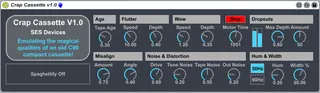
Crap Cassette screenshot

Crap Cassette

by SESDevices

Emulating the sound of a good old C90 playing back on a less...

View on maxforlive.com

Type
Audio Effect
Author
SESDevices
Version
1.0
License
None
Live version
9.1.9
Max version
6.1.9
Downloads
20,731
Updated
No Updates

Description

Emulating the sound of a good old C90 playing back on a less than perfect deck, Crap Cassette attempts to take you on a nostalgia laden trip back to the golden age of the compact cassette, maybe leaving you with a tear in your eye. The only thing missing is the pencil needed to wind the tape back in when your deck turned your favourite album into a pile of brown plastic spaghetti.

No explanation of the controls should be needed, but suffice to say the effects can range from subtle to downright nasty.

SES

Comments (14)

  • blortblort · June 04 2015
    quite awesome and quite useful!... DOES create output delay, but that can pretty much be dialed out by ear...turned my track back by 42ms and all sounds in sync again.
    I had hammered together a rack that did the same sort of wow and flutter thing using the native and other M4L fx, but THIS covers much more territory and is MUCH easier to work with ;)
  • SESDevices · June 04 2015
    The Wow and Flutter will introduce delays but will periodically return to zero so the whole track will effectively stay in sync. The main fixed output delay is introduced by the motor start/stop section. If you want to minimise the any delays through the device and never intend to use the start/stop function, just set the "Motor Time" parameter to 0 :)
  • Anivia · June 04 2015
    Very nice, the motor time could be way above what you got now, kinda nice when you have the ability to exaggerate an effect that is rather limited on the hardware. Maybe an indicator to reflect those hardware limitations.
    Thanks for sharing
  • Anivia · June 04 2015
    Very nice, the motor time could be way above what you got now, kinda nice when you have the ability to exaggerate an effect that is rather limited on the hardware. Maybe an indicator to reflect those hardware limitations.
    Thanks for sharing
  • Anivia · June 04 2015
    Sorry for double post, clicked reload page and then send by accident, please give us a better commenting system synnack.
  • synnack · June 04 2015
    @Anivia would you prefer something like Disqus? see http://www.synnack.com/blog/post/43/maxforlive.com-comment-feedback-needed
  • Anivia · June 05 2015
    Hard to tell if that would be the solution, I like the way it is, so many users are using your site and are probably used to this, something the whole community should be able to vote for actually. All I would really be able to do is delete stupid double posts or correct type errors, maybe the option to post links, images, code...
    Dunno but you have to agree it's quite basic right now :P
  • offthesky · June 05 2015
    this is an absolutely lovely device!! will be using this allot from now on. would love to see a 'tape chew' simulation amount-knob that simulates the warbled low pass panning-distortion you hear from sections of tape that have been physically crumpled.
  • Maerzmusic · June 06 2015
    I'm having trouble exporting a track now that I've added this Cassette plug-in. I've isolated the problem down to the automation of the "Play/Stop" button. When the track exports, it doesn't pick up on the automation, and just thinks it's either on or off, depending on where you select to export. This is a real shame, because the sound of it turning on with a long motor time is very cool, and I really want to be able to use it in this track. If you have any work-arounds, or could figure out a way to patch this glitch, it'd be very much appreciated! (And other than that, it's a great plug-in! Love it!)
  • Maerzmusic · June 06 2015
    edit: I've found a workaround to the problem I just mentioned. If you freeze the track before exporting, it fixes everything.
    Thanks again for the awesome plug-in!
  • SESDevices · June 07 2015
    Thanks for the feedback everyone!
    @offthesky - great idea I'll add it to my list of things to look at for V2.0
    @Maerzmusic - glad you found a workaround. I'll see if there's anything that can be done in the next version.
    I already have a few additional ideas to add for the next version, but if anyone else has any feature suggestions, let me know here and I'll do my best to include them.
  • denbuter · November 09 2015
    Great device, but sometimes for some reason, when I close project and open it again all tracks with this device do not sound. Solution is remove this device from all tracks and put the new ones. very annoying..
  • offthesky · March 23 2016
    i still absolutely love this patch. in fact it gets used in about every track i work on now!
  • newmodernscience · August 19 2016
    @SESDevices What's the best way to contact you about some ideas for a version 2? I would love to send you some money (it's definitely near a place where you could be selling it on Gumroad)

← Back to search