Pitch2Level
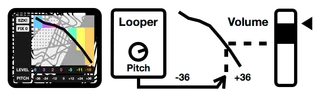
szk.PITCH2LEVEL is made to work with the Ableton Looper Effe...
- Type
- Audio Effect
- Author
- floszk
- Version
- 1.0
- License
- Commercial
- Live version
- 9.0.2
- Max version
- 6.1.2
- Downloads
- 3
- Updated
- 2020-02-19
Pitch2Level is an Audio Effect for Ableton Live by floszk, distributed as a commercial (paid) device. It targets Live 9.0.2 and Max 6.1.2. On maxforlive.com it has 3 downloads. First published 2015-06-08, last updated 2020-02-19. 1 user comment below.
New to Max for Live? Read what Audio Effects do, what the Commercial license means, how to install a device.
Description
szk.PITCH2LEVEL is made to work with the Ableton Looper Effect. It modifies the Y track volume’s level depending of the looper’s pitch/speed X value : Y = F(X). Pitching/speeding makes an offset in the spectral content, resulting in more or less presence for high and/or low frequencies. Track’s volume is also auto-adjusted to reduce/add presence.
Device location
Put the device anywhere on the track where you use the Looper effect (it should be detected).
Set Levels (db)
Use the colored sliders to set levels (from -18 to +6db) for each integer pitch values (-36 -24 -12 =0 +12 +24 +36).
FIX 0 button
Click to quick re-ajust the mixer level to the db value chosen for the =0 pitch.
For more information please visit : http://flo.szk.fr/m4l/
Comments (1)
this is surprising, I notice downloads everyday from Sellfy without complaining and it works fine, the problem may comes from your browser and the Java/Flash behind.
If Sellfy doesn't work for you, you can try Gumroad instead :
• the page for Pitch2Level : https://gumroad.com/l/prHdi
• the page for all our devices : https://gumroad.com/szkdevices
If you continue having troubleshoots, you can avoid these websites and send me an email at flo [at] szk [dot] fr and I will be glad to send you the device directly.
No false promises, only crap technique ;)