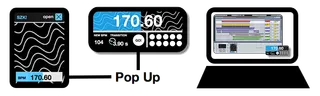
BPM Standalone Window
szk.BPM_WINDOW allows you to monitor and change the current ...
- Type
- Audio Effect
- Author
- floszk
- Version
- 1.0
- License
- Commercial
- Live version
- 9.0.2
- Max version
- 6.1.2
- Downloads
- 3
- Updated
- 2019-07-29
BPM Standalone Window is an Audio Effect for Ableton Live by floszk, distributed as a commercial (paid) device. It targets Live 9.0.2 and Max 6.1.2. On maxforlive.com it has 3 downloads. First published 2015-06-08, last updated 2019-07-29.
New to Max for Live? Read what Audio Effects do, what the Commercial license means, how to install a device.
Description
szk.BPM_WINDOW allows you to monitor and change the current BPM into a floating window. This way you have the possibility to easily keep an eye on the playing tempo during live set or mixing session. A new bpm can be set and targeted with progressive timing.
Device location
Put the device anywhere on a midi or audio track.
Range
Tempo from 20 to 300 BPM.
Timing from 100 ms to 10 seconds.
Control BPM
Enter BPM with keyboard or mouse. BPM can be controled in the floating window or via the on-track device. Default Live BPM is already working.
New BPM
Enter a new BPM, choose a time transition and hit the GO! button.
Save / Load Presets
Shift-Click onto preset to save. Click to recall.
# Memory presets don’t actually work well in all situations. Will be fixed with the next update.
For more information please visit : http://flo.szk.fr/m4l/