Frequency Gate
This is a frequency gate I created based on the template by ...
- Type
- Audio Effect
- Author
- oscillodome
- Version
- 1.0
- License
- AttributionNonCommercialShareAlike
- Live version
- 9.1
- Max version
- 6.1
- Downloads
- 699
- Updated
- 2015-07-07
Frequency Gate is an Audio Effect for Ableton Live by oscillodome, distributed as Creative Commons Attribution-NonCommercial-ShareAlike. It targets Live 9.1 and Max 6.1. On maxforlive.com it has 699 downloads. Published 2015-07-07. 3 user comments below.
New to Max for Live? Read what Audio Effects do, what the AttributionNonCommercialShareAlike license means, how to install a device.
Description
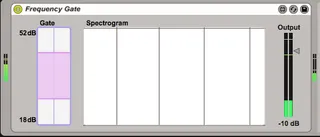
This is a frequency gate I created based on the template by Sam Tarkajian (www.otherbirds.com/about). You can select the minimum and maximum amplitude values in such a way that only the frequencies which amplitudes fit in that range are actually heard.
Instructions:
Click & drag the pink slider to set the minimum and maximum amplitudes.
Shit+drag the minimum or maximum to thange this value only.
Cmd+drag to drag the whole range.
Possible improvements:
-Option to change the window and size of the FFT?
-Control over the range of the amplitudes.
-Anything you can think of.
Thanks & enjoy.
Comments (3)
Maybe multi band? And being able to turn off bands that are not being utilized. I'm thinking of this:
http://rekkerd.org/dtblkfx/
which as an audio unit didn't have an interface. Therefore it was unable to populate a device view in ableton and constrain the segments to the number of bands you wanted. You effectively turned on all 8 gates or none at all, which made it heavier on CPU.
Thanks!
Thanks!