- Type
- Audio Effect
- Author
- floszk
- Version
- 1.0
- License
- Commercial
- Live version
- 9.0.2
- Max version
- 6.1.2
- Downloads
- 3
- Updated
- 2020-02-19
Tweeker is an Audio Effect for Ableton Live by floszk, distributed as a commercial (paid) device. It targets Live 9.0.2 and Max 6.1.2. On maxforlive.com it has 3 downloads. First published 2015-07-02, last updated 2020-02-19.
New to Max for Live? Read what Audio Effects do, what the Commercial license means, how to install a device.
Description
Grip Live’s parameter on a knob, draw an envelope’s automation and trigg it in function of the audio signal input ! Plug any instrument (guitar, bass, keyboard, voice etc…) and remote effects, even on other tracks.
# Device location
Put the devices on any track.
# Grip parameters + Midi mapping
Click the « Set » button on the top-left area. Lock/Unlock will appear over the knob. Proceed one by one (IMPORTANT) :
1# Unlock (button turns green).
2# Click on parameter somewhere on your live set
(parameters can be those on other tracks).
3# Once gripped, the parameter’s name appears.
4# Re-lock (button turns red).
Reset param : same than gripping, but click on button itself.
Midi mapping : map the white knob.
# Meter, Peaks & Leds
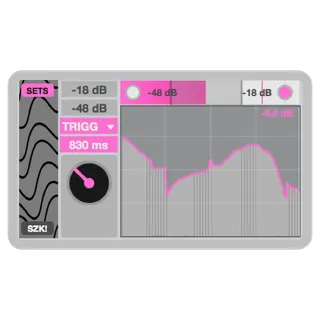
The meter shows the input volume. Leds blink when signal reaches the min and max of the slider range. Signal peak is given by the pink value. Peak’s threshold is set by the max value of the slider range.
# Slider range
Click to define the min and max volumes at which the automation will start the first value then reaches the last value. Top-left numboxes allow you to set the range with more precision.
# Drawing Area
Simply draw the knob automation’s behaviour. First value starts when signal reaches the slider min. Last value when signal reaches the slider max. Knob’s behaviour will follow the enveloppe between these 2 moments/values.
# Modes : Follow / Trigg
• Follow : automations follows volume input into the slider range values.
• Trigg : automation starts when a volume treshold is reached. Tresh. is set by the range min value (that will be the same than max when clicking only once over the slider). Duration is set from 100 ms to 10 seconds.
______________________________________________________
A video about this device :
https://www.youtube.com/watch?v=qEa-8qRFPPg
______________________________________________________
For more information please visit : http://flo.szk.fr/m4l/