Macrobs Minisuite
Macrobs minisuite is a set of 28x custom macro knobs & slide...
- Type
- Audio Effect
- Author
- floszk
- Version
- 1.0
- License
- Commercial
- Live version
- 9.0.2
- Max version
- 6.1.2
- Downloads
- 3
- Updated
- 2020-02-19
Macrobs Minisuite is an Audio Effect for Ableton Live by floszk, distributed as a commercial (paid) device. It targets Live 9.0.2 and Max 6.1.2. On maxforlive.com it has 3 downloads. First published 2015-07-01, last updated 2020-02-19. 6 user comments below.
New to Max for Live? Read what Audio Effects do, what the Commercial license means, how to install a device.
Description
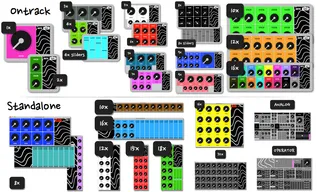
Macrobs minisuite is a set of 28x custom macro knobs & sliders for Ableton Live. Just unlock then click Live’s parameters to create your custom mapping easily. Colors can be set for each button. The minisuite includes 16x on-track and 12x standalone devices, among which two specials dedicated to Analog and Operator synths.
Device location
Put the devices on any track.
Grip parameters + Midi mapping
Click the « Settings » button on the top-right area. Locking/Unlocking will appears for each knob or slider. Proceed one by one (IMPORTANT) :
1# unlock (the button turns green).
2# click any parameter somewhere on your live set (parameters can be those on other tracks).
3# Once gripped, the parameter’s name will appear.
4# Re-lock (button turns red).
5# Do the same sequence for each knob or slider.
Midi mapping : map the Ableton Live buttons (pink).
Reset parameters
Same way than gripping, but click on the button itself.
Colors / Customizing
Click the « Settings » button on the top-right area. Use the increment / decrem. button to choose the knob or slider you want to customize.
Typically from left to right, top to bottom. A « Block Menu » (B1 to Bn) may be available for numerous buttons versions. If so, buttons are selectable by Block then by increment.
# Choose the color.
# Change text color (black or white).
Note : Text area can be edited directly by
entering new text.
# Once a colored is chosen you can paste it on
the selected knob/slider.
______________________________________________________
A video about this device :
https://www.youtube.com/watch?v=p2OLZS7YPlw
______________________________________________________
For more information please visit : http://flo.szk.fr/m4l/
Comments (6)
Thanks
let's say MB is my macro, M the ableton live native's macro, and P a parameter.
- One MB can grip only one P, or only one M.
- A second MB can grip P or M too, so they can be controled by different MB, etc...
- If P is assigned to M, MB can grip M but it can't grip P.
- One MB can grip another MB (just let the "set" button "On" to let the pink live dial appears, this one is grippable).
Hope it helps, let me know !
Could it be an issue in using max 7?
could you tell me for which macrobs ? Have you got some issues with the single one ? For this moment I didn't upgrade to max 7 but I'll do soon, I can't say but a priori there should not have big differences from 6 because the device gets parameters ids. Maybe you could send me an email to tell me more ? Let me know with more details :) : flo [at] szk . fr