- Type
- Audio Effect
- Author
- TheM
- Version
- 1.2
- License
- None
- Live version
- 9.2
- Max version
- 7.0.5
- Downloads
- 995
- Updated
- 2015-09-02
Knobmath is an Audio Effect for Ableton Live by TheM, distributed as freeware, with no license specified by the author. It targets Live 9.2 and Max 7.0.5. On maxforlive.com it has 995 downloads. First published 2015-09-01, last updated 2015-09-02. 4 user comments below.
New to Max for Live? Read what Audio Effects do, how device licenses work, how to install a device.
Description
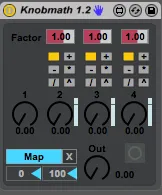
Control parameters in Live with multiple control devices like Envelope Followers, Envelope Generators, LFOs or (unlinked) Envelope curves.
Add , fade or process them in multiple ways.
--------
Hints:
1.Think what makes sense in a musical/rhythmic matter
2. Try it
--
Use modulations (LFOs) on Knob 2,3,4 with the calculation-setting on "+" and map momentary Midi-toggles to the Faders right to the Knobs
--------
The calculations go 1-> 2-> 3-> 4
The product of the knobvalue (0-1) and its corresponding Factor and Fader calculates with the result of the previous calculations (Bypass, +, -, *, /, ^)
-----
Update 1.2: Added 3 Faders to the Knobs (look above in the description). Introduced "Ghost Objects" to guarantee a tight and easier Midi/Key-Mapping
Update 1.1: Removed a Feedback Loop which would overload the CPU especially with Envelope Curves
Comments (4)
+ = addition
- = subtraction
* = multiplication
/ = division
^ =...err... can't find what this one represents! can you tell me? is it a "to the power of" symbol? if not, what?
Thanks!
The incoming number gets raised to the power of the knobvalue.
Cheers