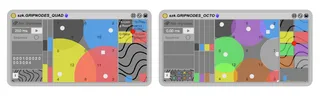
GripNodes
Grip 4x/8x Ableton Live's parameters and to remote them in ...
- Type
- Audio Effect
- Author
- floszk
- Version
- 1.0
- License
- Commercial
- Live version
- 9.2
- Max version
- 7.0.5
- Downloads
- 3
- Updated
- 2020-02-19
GripNodes is an Audio Effect for Ableton Live by floszk, distributed as a commercial (paid) device. It targets Live 9.2 and Max 7.0.5. On maxforlive.com it has 3 downloads. First published 2015-09-08, last updated 2020-02-19.
New to Max for Live? Read what Audio Effects do, what the Commercial license means, how to install a device.
Description
Grip 4x/8x Ableton Live's parameters and to remote them in a XY area. A sequencer is available to let you write your own XY sequence and play it like a loop. Two versions are included : 4 nodes and 8 nodes. This device has been made to manage quadriphonic audio routing through Live Sends but its use can be extended to any other modulable parameter.
______________________________________________________
Videos about this device:
https://www.youtube.com/watch?v=qQELXWrx3cQ
https://vimeo.com/138609865
______________________________________________________
For more information please visit : http://m4l.szk.fr/
______________________________________________________
# GRIP
Click on the red button to make the Grip lock/unlock buttons appear.
Proceed one after one.
Click on L to unlock (the button turns green, it’s unlocked).
Clik on Live’s parameters to grip them. The parameter’s name should appear.
Once it’s done, click to relock and continue with others.
# NODES
The modulation will be function of distance from point to Nodes’s centers. Nodes can be moved and you can modify their radius.
# SEQUENCE
Numbers over the plot indicates possible points of the sequence. Type a sequence (numbers separated by spaces), choose a step value and press start.