Ultra Mega Looper
I made this today because I get hit up now and then about ho...
- Type
- Audio Effect
- Author
- tomcosm
- Version
- 1.0
- License
- None
- Live version
- 9.2
- Max version
- 7.0.4
- Downloads
- 3
- Updated
- No Updates
Ultra Mega Looper is an Audio Effect for Ableton Live by tomcosm, distributed as freeware, with no license specified by the author. It targets Live 9.2 and Max 7.0.4. On maxforlive.com it has 3 downloads. Published 2015-09-17. 5 user comments below.
New to Max for Live? Read what Audio Effects do, how device licenses work, how to install a device.
Description
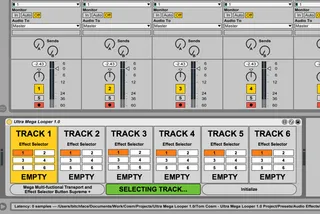
I made this today because I get hit up now and then about how to easily record live looping into separate layers.
The device has one single button, and depending on how you use the button different things happen.
If you hold the button down for more than 1 second, the device will enter Track Selection mode.
In Track Selection mode you hold down the button to cycle through the tracks, letting go when the track you want is highlighted.
Once a Track is selected, click the button once to start recording a loop.
Click it again to stop recording the loop.
Double click it to delete the current loop.
Holding down the button while a track is selected for half a second will enter the device into Effect Selection Mode.
When in Effect Selection Mode, hold the button down to cycle through the 6 different effects.
You can set up your own effects for each track by modifying the devices in the Audio Effect Rack.
Finally, hold down the button for more than a second to return to Track Selection mode where you can move on to a new track.
Let me know if you find any problems, or have any feature requests!
Free download - https://www.dropbox.com/s/okbz0ymy8axt16h/Tom%20Cosm%20-%20Ultra%20Mega%20Looper%201.0%20Project.zip?dl=0
Comments (5)
Thanks for the device.
Does the device require that one manually arms each track?
Also it would be great if the recording of a clip would automatically advances to the below clipslot.
Thx,
I saw your youtube video about this device and immediately came here to check it out. The link though doesn't seem to work. Is it possible for you to fix it?
Thanks for your work!
non ce piu in dowload dove posso trovarlo