- Type
- Audio Effect
- Author
- delicateear
- Version
- 1.0
- License
- None
- Live version
- 9.5
- Max version
- 7.0.6
- Downloads
- 3,639
- Updated
- 2015-11-12
LFOdraw is an Audio Effect for Ableton Live by delicateear, distributed as freeware, with no license specified by the author. It targets Live 9.5 and Max 7.0.6. On maxforlive.com it has 3,639 downloads. Published 2015-11-12.
New to Max for Live? Read what Audio Effects do, how device licenses work, how to install a device.
Description
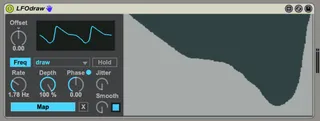
This is the same familiar, beloved LFO device that comes with M4L, but with two new features:
1) You can draw your own waveform.
2) Turbo mode: you can turn off downsampling. This makes the output smooth and useful for audio modulating, but it increases CPU usage. This button is next to the 'Smooth' knob.
Note: You can use one LFOdraw device to modulate the parameters of another LFOdraw device - - but you probably need to turn Turbo mode off for the source LFO. Just experiment and see what works, and only use Turbo mode when you need it.
These modifications to the M4L LFO device were inspired by the excellent 'LFO Tool' plug-in from XferRecords.