a better search for max devices
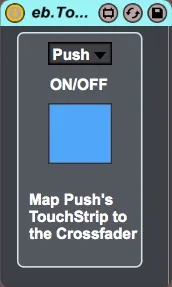
eb.TouchStrip Crossfader screenshot

eb.TouchStrip Crossfader

by dataf1ow

Just a simple device that takes the Push/Push2 TouchStrip to...

View on maxforlive.com

Type
Audio Effect
Author
dataf1ow
Version
1.0
License
None
Live version
9.5
Max version
7.0.6
Downloads
4,640
Updated
2015-11-15

Description

Just a simple device that takes the Push/Push2 TouchStrip to the Crossfader in Live.

It'll post a few errors on initialization. Nothing to worry about ;)

Comments (29)

  • dapper · December 08 2015
    That's just what I wanted, thank you sir!
  • dataf1ow · December 22 2015
    Your welcome!
  • nailmusic · February 05 2016
    I'd like to be able to map the second (record) footswitch to start/stop or Tap tempo.... Would this be something you'd be interested in programming? Otherwise I'll have a go at it based on your initial file (if that's cool with you) and post the results if/when I successfully complete it.
  • MrMoneypenny · August 08 2016
    Thanks, works great with Push 1!
  • kayzee · August 05 2017
    This doesn't work for me. Every time I activate it the crossfader snaps back to the left side.
  • Kuzma · December 26 2017
    Amazing device! It will be more useful if the main button will mappable.
    For me for live performance sometimes important to use touch strip as pitch & sometimes as crossfade. Now I use for crossfade touch strip Arsenal functionality, but it is not very useful. If the main button of this device could be mappable it will be great for mapping to touchosc for example and use switching between touch strip function within jamming. Thank's for sharing!
  • sukebe · May 12 2019
    Is there a text file on where to place the thing?
    I dragged it onto the audio FX lane of 'master'.
    Not clear where to put it.
    Also, what mode is the push2 supposed to be in, user?
    Does the 'fader' snap back or does it stay put?
    Thanks for the work, but I'm completely clueless on how to set it up.
  • concec · May 28 2020
    Game Changer... Thank you so much!!!
    Desperately needed functionality that I can't believe Ableton skipped over
  • concec · May 28 2020
    Can the order be changed... i.e. Channel A being at the top instead of B?
  • dataf1ow · September 29 2020
    @conec Yessir, quite easy to invert the range.
  • OCH · October 05 2020
    @dataf1ow
    Cool device!
    And very handy.
    I took the liberty to give it an update:
    http://bit.ly/ebTouchStrip_v2
  • concec · October 10 2020
    i give up :-) Where exactly would those changes be made? Not a programmer, per se. Any guidance you could pass along would be much appreciated. Can email me directly, if better... [email protected]
  • concec · October 10 2020
    OCH, not sure what enhancements you made. I just see the map options, which im unable to invoke. Seems to be greyed out. Any release notes??
  • OCH · October 10 2020
    @concec
    By default it behaves like original version.
    But if you click "crossfade" button it will turn into "custom" and allow you to map this to any other mappable live parameter.
    Also, I am just now seeing your request from earlier this year. I can add that crossfade reverse feature.
    Here try this one: http://bit.ly/ebTouchStrip_v2-1
  • concec · October 11 2020
    Ahhh... Thank you so much!!!
  • concec · October 11 2020
    hmm... doesn't see to be working. Crossfader cursor is stuck in the middle and won't budge
  • concec · October 11 2020
    not sure if this helps, but this would also be for an audio track
  • OCH · October 12 2020
    @concec
    There was an error in there. Sorrty.
    I've re-uppladed. same link
  • concec · October 12 2020
    So far things are working well! Thanks for the follow up !!
  • clothears · June 01 2023
    I love this device and the other users updates. Any chance of an update for Push 3?
  • OCH · June 01 2023
    @clothears
    Happy to work on updates for push 3, on this and other devices. if anyone is able to send me a push 3 😀
  • clothears · June 04 2023
    @OCH
    Perhaps I could Discord with you and you could tell me how to get the control names out of the device?
  • dataf1ow · December 28 2023
    Wow, didn’t realize this has been so active. Just got a push3 so I’ll work on an update for this in the next few days
  • oinarriz · March 13 2024
    Hey would an update for push 3 be possible? That would be insane!
  • maxijak · March 15 2024
    This doesn't seem to be working with Ableton 12 any more :( Is there a way to update custom M4L devices for A12?
  • hangarsliquides · August 29 2024
    Any update on porting this to L12 / Push3 ?
    You could easily make it a commercial device.
  • dataf1ow · August 30 2024
    Sorry for the radio silence - I did try to update this, but hit a bit of a roadblock. Details were posted in the C74 forums:
    https://cycling74.com/forums/push12-vs-push3-control-surfaces-api-differences-and-documentation?replyPage=1#reply-669acf7730741d0012a37aad
    There may have been some updates since then, but I never got any clarity on the changes with the way the Push3 touchstrip reports its value back to the Live API
  • midside89 · March 01 2025
    This is a fantastic device; however is not compatible with Live's latest version, 12.1.5. Would it be possible to get a newer version compatible with Ableton Live 12? That would be great, thanks!
  • TomSine · May 12 2025
    Sorry, doesn't work on Push 2 in Ableton Live 12.11
    Used versions 1.0 and 2.1

← Back to search