LP S7epper
This patch is heavily based on the Stepper from the brillian...
- Type
- MIDI Effect
- Author
- ldmdevices
- Version
- 1.6
- License
- None
- Live version
- 9.5
- Max version
- 7.2.3
- Downloads
- 4
- Updated
- 2016-06-30
LP S7epper is a MIDI Effect for Ableton Live by ldmdevices, distributed as freeware, with no license specified by the author. It targets Live 9.5 and Max 7.2.3. On maxforlive.com it has 4 downloads. First published 2016-06-07, last updated 2016-06-30. 10 user comments below.
New to Max for Live? Read what MIDI Effects do, how device licenses work, how to install a device.
Description
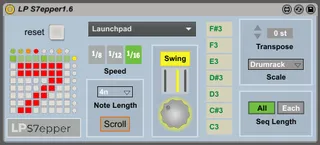
This patch is heavily based on the Stepper from the brilliant 7up monome patch. I have built this patch from the ground up so it is entirely native to the Launchpad. It has a swing option, sequence length and a more flexible velocity section.
The S7epper controls 7 midi notes and includes a sequencer page, which allows for 8 pages for variations. The top buttons, left-to-right, control Sequence page/Swing/Velocity page/Play-Stop. The buttons on the right select which page is viewed. Like the 7up stepper, you can also copy one page to another by holding one button and pressing another.
v1.1 – bug fixed for the Swing function coming on the wrong beat sometimes.
v1.5 - fixed red line staying on the pads, looks cleaner now. Video on the website now to see a demonstration.
v1.6 - fixed bug with copy/paste system. Rearranged layout on LP, added LED feedback to show what page is being played, put sequence length controls in the velocity page. Added scroll feature. Patch GUI updated. Note length added for using synths rather than drums.
Comments (10)
I tested it and was a little confused about the control sequence page.
other things are intuitive and self explaining.
What about turning the line with the sequences 90 degree clockwise?
It looks more logical and the sequences run then from left to right also the sequences are in right place.
and what about a length selection for 1-8 pages and also page scrolling on and off.
Hold on, your sequencer is it worth, i love it for the swing.
I own LPC2 from native control, the drum seq is good, but has no swing, i love light patterns, it gives you more overview over the rhythm.
Greetings
length
I was intending to make a video to demonstrate the use, but i didn't have a chance just yet!
I'm a little confused, the sequence runs left to right, right? The original 7up one went top to bottom which for me was not logical.
The green bar at the top of the grid is used to change the length of the sequence.
Scrolling is a nice idea! If I get time to come back to this patch I will look into that option.
good idea.
Thanks for the new Versions, trying it soon.
I love you
hold on, especial for the launchpad...
Greetings
Thanks for this device! Very intuitive and easy-to-use while offering lots of possibilities.
There seems to be a problem with the Reset button, as every time I click it the drums continue to play and the lights go out when the vertical scroller passes only to reappear when the sequence starts again.
Some ideas:
- Would you consider adding the possibility to save and recall presets? There are simple patterns I'd like so start with and then change on the fly. Maybe the right column of buttons could be used to change presets on the fly?
- Maybe use a right-column button for Scroll On/Off. Or replace the Start/Stop button with it, as this is not so useful in performance.
Cheers,
Simon