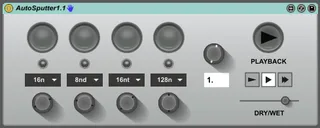
Autosputter
A simple device that gives you 4 buttons of stuttering loop ...
- Type
- MIDI Effect
- Author
- ldmdevices
- Version
- 1.1
- License
- None
- Live version
- 9.5
- Max version
- 7.2.3
- Downloads
- 3
- Updated
- 2016-07-04
Autosputter is a MIDI Effect for Ableton Live by ldmdevices, distributed as freeware, with no license specified by the author. It targets Live 9.5 and Max 7.2.3. On maxforlive.com it has 3 downloads. First published 2016-07-02, last updated 2016-07-04. 11 user comments below.
New to Max for Live? Read what MIDI Effects do, how device licenses work, how to install a device.
Description
A simple device that gives you 4 buttons of stuttering loop power!
Based on the old Instajungle vst (and a handy tutorial by Ned Rush), this will simply loop any incoming audio in small pieces to create glitching stutter effects. You can play in reverse, and at half and double speed. There’s also a knob to sweep across the loop size/speed for jolly glitchy fun time.
Have fun!
v1.1 - button rate can now be changed while the button is pressed. Dry/wet crossfader added
Comments (11)
Now I'm thinking though it may be useful to only have particular rates in each menu, like one button for n , one for nt, one for nd . That way changing the rate should double or half as you turn the knob....
also seems as the main transport and the clip tempos freak out the device so that the effect is not always similar each time played. even with automation.
thx
I try to custom the 4 buttons with custom times, for example:
4n - 8nt - 8nd -2n
And i rename with a custom name the device in workflow, and save as preset.
I save my live session with all this, when i reopen live, the settings doesnt remain, nor my saved user preset...
Is this happenning the same to you? Is so annoying having to config your settings every time, you know...
Anyway, amazing job, and thank you!
Jozz
I try to custom the 4 buttons with custom times, for example:
4n - 8nt - 8nd -2n
And i rename with a custom name the device in workflow, and save as preset.
I save my live session with all this, when i reopen live, the settings doesnt remain, nor my saved user preset...
Is this happenning the same to you? Is so annoying having to config your settings every time, you know...
Anyway, amazing job, and thank you!
Jozz