- Type
- Instrument
- Author
- Phatline
- License
- AttributionNonCommercial
- Live version
- 8.2
- Downloads
- 1,066
- Updated
- 2010-10-13
nochSimpler5 is an Instrument for Ableton Live by Phatline, distributed as Creative Commons Attribution-NonCommercial. It targets Live 8.2. On maxforlive.com it has 1,066 downloads. First published 2010-10-05, last updated 2010-10-13. 2 user comments below.
New to Max for Live? Read what Instruments do, what the AttributionNonCommercial license means, how to install a device.
Description
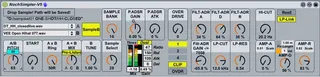
duophonic 2Voice Drumsampler (2 midintoes, and for each note 2 voices) optimized for work with Midicontrollers.
How to get a sound out of it?
1. Take from the Ableton Browser a Sample and drop it into the left-top-Area "Drop Sample! Path will be Saved!"
2. Move "Sample Select" to select a Sample from the Path - where the droped sample was.
3. Move "Sample bank" to select a the sample bank.
Prinzip of Sample Bank & Sample Select and the "Drop Sample" field:
* When you drop a sample, then it path will be send to the "Menu A", Menu A now list all samples that locatet in the path of the droped sample.
* When you now send a Number to the "Menu", the menu take the number as an "index" and put out the sample name which is locatet @ this index.
* Sample Select & Sample Bank just making Number together, So when you are on Bank 2, the "Sample Bank" Rotary puts out the number 3 (0 1 2), when the "Sample Select" outputs a 4 (4th sample of the 2nd bank ...maximal 64 samples pro bank) you get follwing calculation: (3x64) + 4 = 196th Sample in the Menu! (in the sample folder)
5. Open the LP-CUT
6. Turn AMP-D to right
7. Turn A/B-Pitch to 0 (zero)
8. Now set the Pitch offset (the bluegreen-numbox under the Text "A/B Pitch")- turn it from initaly -200 to a value until you hear a sound... turn it to your lowest Tune you like to have.
9. Turn A/B-Pitch to 65, now you should have a "normal" tune...
10. SampleA/SampleB: Maybe you noticed that there are 2 Menues with sample content in it...they share the same sample folder that you droped.
When you press the "SampleA" Button, you can select with the SampleBank/sampleSelect-Rotarys the Sample A, when you press SampleB you will load with the Rotarys Sample B.... the rotarys positions will be stored with the liveset and with the "Sample Bank Button", and if you Midicontroll those Button and Rotarys, the Rotarys will automatic jump to the right Position when you press the Sample-Bank-Button.
11.Start: Sample Start Position (scaled *25% with the total sample time)
12. AxB Ring: Ring Modulates Sample A and B together, WARNING: the A+B Mix Rotary Must be around middle Position, elswere you have a multiplication with zero, and zero is zero sound ;-)
13. A+B Mix: This Simple Mix Sample A+B &&& if you turn it the Prelisten Function automaticly Turns on, and in all other Instances of NochSimpler the Prelisten is turning off, what doe the prelisten function?
* When you turn A+B-Mix to Left, you will hear on your Max-output Sample A, and on your Prelisten Channel you will hiear Sample B!
* How to get a prelisten Channel? Make a new audio track, put in a new "Max audio effekt" edit this oudioeffekt, make a new standard object, write this in it "plugsend~ NochSimpler-Pre-Listen" connect it to the Audio-outs, save & close the patch. Now here comes the Prelisten sound with some latency out....
* This Function is only to check the new sample that you want to load...
14. B-Tune - Only changes the Tune of Sample B... this is for Detuning + for modulation when you you RING-Mode the 2 samples togehter
15. P.ADSR.GAin: modulates the Pitch negativ and positiv
16. P.ADSR.ATK: is the Attack time for the P.ADSR.GAIN
---The Signalflow of this sampler is from left to right > Sample enginge > Sample mix > Compression > Overdrive > AMP-ADR > FILTER-ADR
17. Compressorsection: Note that Release & Attack are not in time format, they are in Rate, so you have the opposite Effect then normal!
* Mix: -50 = Orginal +50= Compressor only....GAIN: is for gain setup...because of sometimes extremley loud settings (CAUTION - LOUDSPEAKER AND EAR-DAMAGE!!!! REALLY!)...The REst is normal
18. Overdrive: the rotary should be clear... "1 2 4" devides the Overdrive Rotarys output (it changes the maximum ammount), "Clip/OVDR" should be clear meens Distortion or Overdrive
19. the rest should be somewhat of clear!!!!!!!!!!!!!!!!!!!
20.You noticed the 2 Buttons over the AMP-Decay Rotary?
* Fix Lenght: It changes the AMP-Decay Length in Milliseconds to a fixed value...when turned of, the Sample A-Lenght will scale the AMP-Decay-Rotary-output
* Vel: this add the midi-Velocity to AMP-Decay...how much is setuped with the live-numbox right to the button...
21. the Live-Numbox over the AMP-Release Rotary, change the scale factor of the Sample lengtht that is given by SAMPLE A.... so when you turn it to 0,7 the Release Rotary onley reaches 70% of the notelength...in most cases, you will turn on some AMP-DECAY...so you dont need full Releasetime... yep...so this little numbux has the right to exist ;-)
When the samples on Startup are not loadet right, just switch "Sample Bank-Select-switch" on and off - tis load the saved samples in the sample machine.
Comments (2)
*More CPU saving that V4, but more CPU using that V1...
*No Browsing anymore - just drag and drop the sample(path)
*Reduced Filesize from 900kb to 600kb
*Deleting of the Pitch-LFO... In Livesituations the PITCH ADR-Attakc/Depth - for me is enough
*Clean up
*Dualband compression bevore (pre) Distiortion/VCA/VCF
*Ringmod
*Prelisten
*AMP-ADR-Decay now can modulatet with the Midi-Velocity
*AMP-ADR-Decay can now be in fix time, or scaled with the sample time
*AMP-ADR-Release can now also scaled with a numbox for your wishes....
Ideas for V6:
Deleting Filter ADR...because of not using it in Livesituations.
Cleaning
Reduce CPU-Load and filesize....
Debug the problem, that sampleB is not loadet automaticly in the sample engine (workaround up to now is, press the sample-bank-select-button 2 times @ liveset startup)
...But after that - this project will be finished.