- Type
- Audio Effect
- Author
- RutterStudios
- Version
- 1.1.0
- License
- AttributionShareAlike
- Live version
- 10.1.9
- Max version
- 8.1.1
- Downloads
- 7,529
- Updated
- 2020-06-08
MultiMap Pro is an Audio Effect for Ableton Live by RutterStudios, distributed as Creative Commons Attribution-ShareAlike. It targets Live 10.1.9 and Max 8.1.1. On maxforlive.com it has 7,529 downloads. First published 2018-01-07, last updated 2020-06-08. 12 user comments below.
New to Max for Live? Read what Audio Effects do, what the AttributionShareAlike license means, how to install a device.
Description
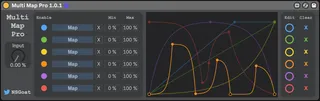
MultiMap Pro is a one-to-many control mapper with custom transfer functions.
Up to 6 Ableton controls can be mapped to one control knob, each with individual mapping curves.
The patch can be loaded on any channel and mapping assigned to controls on any channel. This patch extends the functionality of MultiMap from the Max for Live Essentials bundle.
To edit a function mapping - tap the edit button to the left of the function
Add points - Click in function box
Delete points - Shift-click on a point
Apply curve - Option-drag on line
I have tested the patch on Mac but do not have access to a Windows machine to test.
Release Notes
v1.1.0
Parameter output smoothing to reduce audio clicks during automation and control.
v1.0.1
Fix bug where controls could not be mapped.
v1.0.0
Bug: When the .amxd patch is first used it only allows one control to be mapped.
Workaround:
1. Add MultiMap Pro to a track in Ableton
2. Open the patch in Max4Live
3. Enable all mapping outputs (enable buttons)
4. Close patch in Max4Live (no need to save)
5. Save patch as an .adv in Ableton
6. Load .adv in future (rather than .amxd)
Comments (12)
Live 9 64
Once you have opened and enabled all mappings, are you able to map them after workaround step 4? Or you are never able to map more than one control?
Great plugin! I like that I can create/draw my own 'easings'.
I do have a question regarding 'unmapping' parameters with the X button.
What I've noticed is that if I map to, for example, a volume slider on channel 1 and then later on decide to unmap it (click X), save my session and open up the session again later, it has remapped to the volume slider of channel 1.
Is this intended use? Or maybe a bug?
I have also found this issue with Multi Map TS 1.1 and will contact the creator. Unless I'm mistaking the functionality of the X button. Hope to hear from you!
Live 9.7.5
Yes this is a bug I'm sad to say. I am not am not able to figure out what is causing this. I have tried to fix this and the .amxd issue in the description but have sadly had no success. I must admit, I am not a Max-Ninja at all. I merely wanted to crossfade between two reverbs on an aux channel with a custom curve, but got a little carried away when I delved into M4L.
The mapping part is all pulled straight from MultiMap. I think it is something in the MultiMapPro/M4L.MapButtonMultiSingle/Mapping/getParamInfo sub-patch.
If anyone has fixed or knows how to fix this, or the other bug mentioned in the description, please fire me a Tweet @NSGoat.
live.remote~: inlet: bang: wrong message id
I believe it has something to do with the bpatcher to map the parameters since I can't map.
Any clue?
cheers
b
They appear to map as the macro becomes greyed out, but nothing happens as I adjust the knob in the patch.
Any help would be greatly appreciated.
When I try opening it in Max, I see a bunch of errors that say the following:
js: can't find file stringFormat.js
live.remote~: inlet: bang: wrong message id
Thank you!