- Type
- Audio Effect
- Author
- TheLoser
- Version
- 1.0
- License
- AttributionNonCommercialShareAlike
- Live version
- 9.7.5
- Max version
- 7.3.4
- Downloads
- 233
- Updated
- 2018-03-08
Swap Pan is an Audio Effect for Ableton Live by TheLoser, distributed as Creative Commons Attribution-NonCommercial-ShareAlike. It targets Live 9.7.5 and Max 7.3.4. On maxforlive.com it has 233 downloads. First published 2018-03-06, last updated 2018-03-08.
New to Max for Live? Read what Audio Effects do, what the AttributionNonCommercialShareAlike license means, how to install a device.
Description
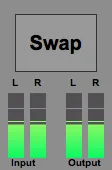
Swaps the Audio-Signal in the left and right channel of a stereo signal with each other.
...Yes, I know, we can do this also with the native “Utility”-Device, when switch the Channel Mode menu to "Swap" and use the Active-(On/Off)-Button for the device,
But you can save some little time by using this device if you don´t already got a similar preset of Utility,
+ you got a bigger dBFS-Monitor of the Input and Output-Stereo-Signals as better as you got in the device-chain.
You can also automate the triggering of the Swap-Button. Nice to create some raw DIY-Pan Effects!
NOTICE for MONO-Signals: As Live will basically diverse an incoming Mono-Signal in one input of Live exactly equal in Volume to both Stereo-Channels, No Effect will be applied to that kind of “Pseudo-Mono-Signals” with this device.
This is totally different by such “Pseudo-Mono-Signals" when you insert a Pan-Audio-Effect like you can do with the “Utility”-Plugin before this device in the chain. Than the Swap! Pan-device will make an notable change in the resulting Stereo-Signal as it swaps the right and the left Channel with each other.
Thanx for take care of me.