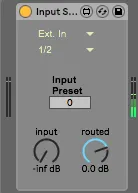
Audio Input Selector
Allows user to select input on an audio track with a knob th...
- Type
- Audio Effect
- Author
- ndivuyo
- Version
- 1.0
- License
- None
- Live version
- 10.0.1
- Max version
- 7.3.4
- Downloads
- 1,144
- Updated
- No Updates
Audio Input Selector is an Audio Effect for Ableton Live by ndivuyo, distributed as freeware, with no license specified by the author. It targets Live 10.0.1 and Max 7.3.4. On maxforlive.com it has 1,144 downloads. Published 2018-03-11. 7 user comments below.
New to Max for Live? Read what Audio Effects do, how device licenses work, how to install a device.
Description
Allows user to select input on an audio track with a knob that can be assigned to a controller. This allows for quick selecting of input during performances, etc. (Live 10 only!!)
Ugly simple device I made this morning for my live setup
better stuff:
dillonbastan.com
Comments (7)
Great job, as always.
respect,
A.
This is a fantastic device. Great Job. Works great with all Ableton devices, however, it doesn't work properly with the third party plugins. I tried to send inputs from Kontakt, Omnisphere or Reaktor and it wasn't possible. It shows only pre FX, post FX and post mixer. Is it possible to get these third party plugins' outputs working? Would be absolutely amazing. Cheers!